
Sales Enablement Automation: The Complete Guide for 2026

The global sales enablement platform market was estimated at USD 5.23 billion in 2024 and is projected to reach USD 12.78 billion by 2030, so the answer isn't “buy more AI.” It's sales enablement automation that instruments the workflow first, then uses real-time data to help reps act on intent instead of hope.
That's the part many organizations overlook. They hear “automation” and reach for another tool, when the true win comes from making the right actions repeatable, measurable, and tied to buyer signals.
Table of Contents
The Automation Trap Most Sales Teams Walk Into
The pattern is painfully familiar. A team buys a shiny new platform, loads in some content, connects a few fields, and waits for pipeline to get better by osmosis. Instead, reps keep working the same way they always did, only now there are more notifications.
That's the automation trap. Teams automate motion before they instrument behavior, so the software becomes faster busywork instead of a better system. The tool isn't usually the problem, the workflow is.

A familiar story with an expensive ending
I've seen teams celebrate launch day and then stop talking about the platform two weeks later. The reps still pull lists manually, managers still ask for updates in Slack, and the CRM keeps filling up with half-finished notes. The software looks active, but the workflow hasn't changed.
That's why the link between automation and activity matters. If you're only counting whether a tool was deployed, you're measuring procurement, not performance. A better question is whether the system is capturing seller behavior, surfacing the next action, and reducing the gap between intent and outreach.
Practical rule: If the team can't explain what data the workflow uses and what action it triggers, the automation is decorative.
A good mental model is simple. Automation should remove repeated decision-making, not remove judgment. That difference separates a system that helps reps sell from one that just produces more digital clutter. For a useful lens on what sellers are doing day to day, the activity-tracking perspective at RoverLead's sales activity tracking guide pairs well with this workflow-first mindset.
What Sales Enablement Automation Actually Means
Sales enablement automation is the practice of using connected systems to handle repetitive, data-heavy work that doesn't need a rep's full attention. That includes CRM auto-sync, follow-up triggers based on buyer behavior, content surfacing at the right moment, and lead prioritization when signals change.
It's not the same as “we have a CRM.” A CRM is a system of record. Automation is a system of action that reacts to what the buyer does and pushes the next useful step to the rep.
Manual enablement vs. automated enablement
Dimension | Manual Enablement | Automated Enablement |
|---|---|---|
Signal source | Rep memory and static lists | Living intent data and behavioral triggers |
Content delivery | Reps hunt through folders | Relevant assets surface in context |
Follow-up | Human calendar reminders | Event-driven sequences and prompts |
Data quality | Notes and fields filled after the fact | Auto-sync and field completion in the workflow |
Coaching | Periodic review and guesswork | Interaction data and feedback loops |
Primary risk | Inconsistency | Bad data or over-automation |
The shift is already mainstream. 90% of organizations reported having a dedicated sales enablement team or program in 2023, up from 75% in 2022, and AI adoption among sales professionals rose from 24% in 2023 to 43% in 2024 source. That doesn't mean every rollout is smart. It means the category has moved from experimental to operational.
A practical distinction matters here. Manual enablement depends on memory, list pulls, and rep discipline. Automated enablement depends on clean signals, rules that make sense, and a workflow that doesn't ask the rep to do extra work just to benefit from the tool.
For teams comparing platforms, the question isn't whether the technology exists. It's whether the platform changes behavior inside the rep's daily motion. That's why a platform discussion belongs in the workflow conversation, not in a separate software shopping spree. For a broader platform framing, see RoverLead's sales enablement platform overview.
The Core Components of a Working Automation Stack
A working stack doesn't need a parade of tools. It needs four parts that talk to each other, with the CRM as the backbone and the other pieces feeding it cleanly.
The stack only works if the data does
CRM integration is the foundation, but only if the inputs are trustworthy. Content management keeps reps from hunting across folders for the right asset. Coaching and feedback loops turn interaction data into better behavior. Analytics tell you whether the system is improving usage, data integrity, and cycle time.
A tool can be fully licensed and still fail if the team doesn't use it or if the sync is flaky.
That's why the useful metrics are not vanity counters. Treat the rollout as a chain of instrumentation: provisioning rate, active-user ratio, core-feature usage, advanced-feature adoption, auto-sync success rate, and field-completion rate source. Those numbers separate deployment from real usage. They also tell you where the stack is breaking, whether the issue is adoption, integration, or data quality.
What the stack should do in practice
CRM Integration: Capture activity without making reps retype everything.
Content Management: Surface the right deck, case study, or sequence based on context.
Analytics and Intelligence: Show which signals are leading to action, and where the workflow stalls.
Delivery and Outreach: Trigger the next move when buyer behavior justifies it.
That's the difference between five disconnected tools and one operating system for selling. If the stack is healthy, reps spend less time reconstructing what happened and more time deciding what to do next. If it's not, the team gets lots of dashboards and not much progress.
For a practical comparison of tool categories and workflow fit, the tool-focused lens in RoverLead's sales automation tools guide is worth a look.
Benefits That Separate Automation from Activity
Automation is only interesting when it changes the kind of work the team does. Saving a rep ten minutes on admin is useful. Putting the right message in front of the right buyer at the right time is where the money is.
Efficiency matters, but effectiveness compounds
The most automated sales processes include meeting scheduling (42%) and content automation (40%) source. Those are easy wins because they remove repetitive work that reps hate doing manually. Practitioners using a sales enablement platform also report win rates that are 7% higher than those who do not source.
Motion | Manual approach | Automated approach |
|---|---|---|
Scheduling | Back-and-forth emails | Self-serve booking and trigger-based routing |
Content delivery | Rep searches and guesses | Asset recommended in context |
Lead prioritization | Static list review | Signal-driven next-best action |
Follow-up | Generic reminders | Timed outreach based on behavior |
That's still only half the story. The lift comes when automation reduces guesswork. If a rep can see who's commenting on competitor posts, engaging with pricing conversations, or signaling interest publicly, outreach stops feeling random. It becomes timely.
Bottom line: Efficiency clears the calendar. Effectiveness fills the pipeline.
The practical payoff is cycle time, not just volume. Teams waste less energy on dead ends and spend more time on conversations that already have a reason to happen. A good lead-scoring workflow fits naturally here, because it decides what deserves attention before a human burns time on it. For a deeper look at that layer, see RoverLead's lead scoring automation article.

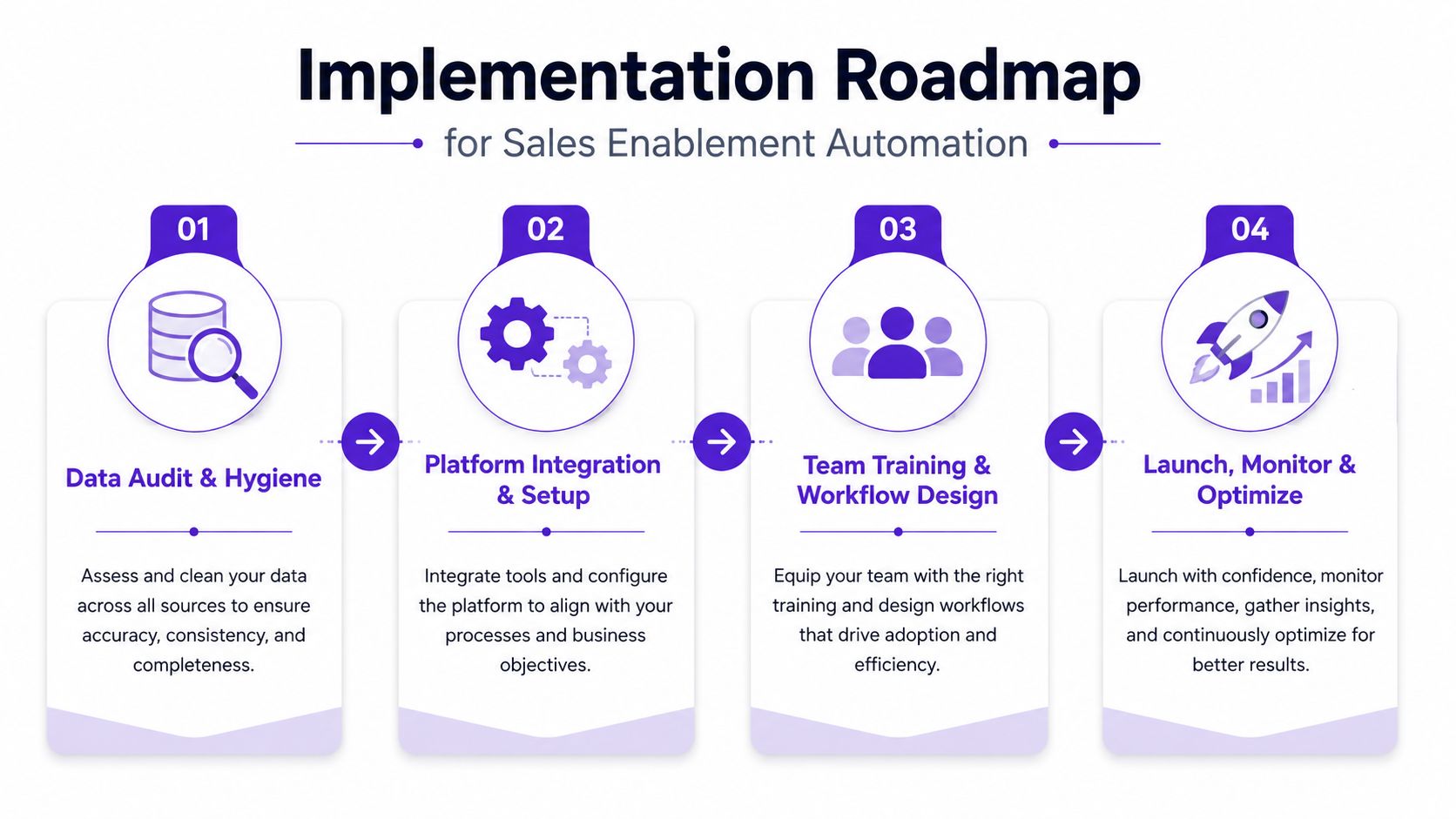
Implementation Roadmap for Sales Enablement Automation
The implementation order matters more than the logo on the software box. If the CRM is messy, automation just spreads the mess faster. If the workflow is undefined, automation makes the confusion look efficient.
Start with the data stack, not the feature list
A clean rollout starts by auditing current tools and identifying what reps need in their day-to-day motion. Then clean the data before you connect anything. That sounds boring, but boring beats broken.
Audit data and process gaps. Find the fields, handoffs, and manual steps that keep repeating.
Clean the CRM. Remove duplicate records, standardize key fields, and fix the obvious junk first.
Define KPIs. Use metrics like active-user ratio, auto-sync success rate, and field-completion rate.
Pilot with a small cohort. Choose reps who'll tell you what's clunky instead of nodding politely.
Scale only after the pilot behaves. If the workflow isn't reliable, expansion just creates more tickets.
That order is the point. A messy CRM fed by automation produces faster mess, not better execution. A pilot gives you a chance to see whether the tool is helping reps do the right thing, not merely generating activity.
What to watch during rollout
Auto-sync breaks: Stop scaling if events aren't flowing cleanly.
Low active usage: If reps aren't using the core features, the issue is adoption, not ambition.
Weak field completion: If the CRM still lacks context, forecasting and coaching both suffer.
The emerging best practice is simple. Instrument before you automate. That's especially true in messy, multi-tool environments where sales, marketing, and enablement all touch the same records but don't always agree on what “done” means. For a workflow-first way to think about tools and orchestration, the platform and automation pieces are easy to compare against RoverLead's automation tooling overview.
Common Pitfalls and How to Avoid Them
The first pitfall is confusing speed with value. Faster output sounds impressive until a rep sends ten generic messages that all read like they were drafted by a well-meaning toaster. Gartner's warning is the right one here, review generative AI output for whether it sounds like something the seller would say, whether the data is accurate, and whether the message feels natural source.
The second pitfall is trying to automate around bad data. You can't clean up a broken workflow by adding more automation on top of it. You just get more polished nonsense.
Guardrails that keep automation useful
Keep humans in the loop for complex deals. High-stakes accounts still need judgment, context, and nuance.
Pilot before scale. A small test cohort exposes friction early.
Check message authenticity. If the output sounds robotic, buyers will feel it.
Protect CRM hygiene. Bad source data ruins downstream recommendations.
A lot of teams get seduced by volume. They see more outreach, more content, more triggered actions, and assume the machine is helping. In reality, the machine may just be amplifying the worst parts of the playbook.
The best safeguard is discipline. Automation should support rep judgment, not replace it. If a sequence helps a seller move faster but weakens the quality of the conversation, it's probably not helping revenue. It's helping inbox volume.
LinkedIn Intent-Based Use Cases for Sales Teams
LinkedIn is where this gets practical fast. Static prospect lists are fine if your goal is to stay busy. Intent-based automation is better if your goal is to show up when someone is already paying attention to the topic, creator, or competitor you care about.
For SDRs and BDRs
Traditional Sales Navigator work starts with filters and ends with guesswork. Intent-based automation flips that. Instead of pulling a cold list and hoping timing works out, reps get a curated feed of signals tied to real activity, then respond with context while the thread is still warm.
That changes the job. The rep spends less time researching and more time having a conversation that already has a reason to exist. For outbound teams, that means cleaner prioritization and fewer wasted touches.
For founders and solo sellers
A founder doesn't have time to babysit a giant prospecting process. Automation helps by turning engagement into a daily lead flow without requiring a full SDR team. The value isn't just scale, it's consistency. The system keeps surfacing people already close to the problem.
For GTM marketers and agencies
The best use case is often invisible until you're in it. When your buyers are discussing pain points, competitors, or budget questions in public, automation can route that signal into a usable outreach motion. RoverLead AI does this through LinkedIn campaign automation, which automates outreach campaigns around social signals and intent, with signal capture, event-driven triggers, predictive scoring, AI-written openers, and routing rules.
Teams using intent-driven tools often report stronger response quality, more meetings, and less research time, but the bigger story is simpler. Relevance shows up sooner, and rep time gets spent where it can move a deal.
If you want to build sales enablement automation around live LinkedIn signals instead of stale lists, RoverLead AI turns engagement into curated intent-driven leads with context and an AI-written opener. Visit RoverLead AI to see how signal-based prospecting can fit into your workflow and replace the manual list-pulling circus with something a lot more useful.
FAQ
What is sales enablement automation?
It's the use of connected systems to handle repetitive sales tasks, surface the next best action, and keep buyer signals tied to rep execution. The point is to make the workflow more responsive, not just faster.
Is sales enablement automation the same as CRM automation?
No. CRM automation usually handles field updates, reminders, and internal workflow steps. Sales enablement automation links those mechanics to content, coaching, buyer signals, and outreach decisions.
Why do so many automation projects fail?
They usually fail because the team automates before cleaning the data or defining the workflow. If the inputs are bad, the output just gets bad faster.
What should I measure first?
Start with active-user ratio, auto-sync success rate, and field-completion rate. Those tell you whether the system is being used and whether the data is usable.
How does AI fit into sales enablement automation?
AI helps with content generation, signal interpretation, coaching prompts, and next-best-action recommendations. It works best when it's fed clean data and reviewed by humans where nuance matters.
Does automation reduce the need for sales reps?
No. It reduces repetitive admin and makes it easier for reps to spend time on conversations, judgment, and deal strategy. The rep still has to sell.
What's the biggest risk of over-automation?
You end up with messages that feel generic or unnatural, which hurts trust. If the output doesn't sound like the seller, buyers notice.
Where should a team start?
Audit the workflow, clean the CRM, define the KPIs, then pilot with a small group. Don't scale until the system is stable and the data is trustworthy.
What's the difference between deployment and adoption?
Deployment means the tool exists in the stack. Adoption means reps use it in daily work and the data that comes out is reliable.
Can automation help LinkedIn prospecting?
Yes, especially when it uses live engagement and intent signals instead of static firmographic lists. That's where timing and relevance start working together instead of fighting each other.