
Sales Activity Tracking: The Witty Guide to Real Intent
Your CRM says the reps were busy. LinkedIn DMs went out, calls got logged, meetings were “scheduled,” and the dashboard looks healthy enough to survive a board meeting. Then Friday arrives, the calendar is still weirdly empty, and the only thing that's moved is your tolerance for meaningless activity totals.
That's the trap with sales activity tracking. Without context, it turns into a tidy little scoreboard for motion, not momentum. The fix is smarter tracking, the kind that separates a logged touch from a meaningful one, and shows which interactions carry buying intent.
Table of Contents
Sales Activity Tracking and the Empty Calendar
The empty-calendar problem usually starts with good intentions and ends with heroic-looking reports. A rep sends a stack of LinkedIn messages, logs a parade of calls, and records follow-ups with the kind of confidence usually reserved for people who've already booked the meeting. Then the buyer disappears into the same digital fog where half-finished demos go to die.
That's why raw hustle can be so misleading. A team can look busy in the CRM and still miss the only thing that matters, whether the right people moved closer to a decision. The more useful question is not, “Did we touch the account?” It's, “Did the touch reveal intent, widen the thread, or advance the stage?”
Practical rule: if the dashboard can't distinguish between a lonely voicemail and a multi-threaded conversation with buying roles, it's counting work, not tracking progress.
The good news is that sales activity tracking can show more than motion if you build it with the right fields and the right habits. That means treating LinkedIn comments, email replies, call outcomes, and meeting notes like evidence, not decoration. If you want to go further on the outbound side, it's worth keeping related reading close at hand, especially on LinkedIn outbound and intent data, because those are the places where empty calendars often start to turn around.
What Sales Activity Tracking Truly Means
A rep can fill a CRM with touchpoints and still leave you blind to buyer intent. Sales activity tracking is the disciplined capture of calls, emails, meetings, and LinkedIn interactions, plus the context that shows whether those touches moved the deal forward. Logging contact attempts is basic admin. Reading the signal behind them is where the work gets useful.
A clean inbox does not mean a healthy pipeline. It just means someone spent time arranging the clutter. Sales tracking works the same way, because a recorded touch only matters if you know who was involved, what happened, and whether the interaction showed any buying motion. A lonely LinkedIn view is not the same as a reply from a director, and a polite email response is not the same as a thread that pulls in finance.
The fields that matter
The strongest setup captures both quantitative and qualitative fields at the touchpoint level. For emails, that means sent or received status, recipient role, response flag, thread length, and time-to-reply. For calls, it means duration, outcome such as connected, voicemail, or no answer, and disposition. For meetings, it means attendee roles, meeting type, notes, and next steps. For LinkedIn, it means profile visits, comments, replies, connection acceptance, and whether the exchange shows curiosity, not just courtesy.
This structure matters because it lets teams compare raw activity with buying signal. A pile of touches can look productive and still miss the account with real momentum. A smaller set of interactions can matter more if the right people are replying, looping in colleagues, or shifting from small talk to specific requirements. That's why structured touchpoint tracking is stronger than a simple count. It helps analysts separate busywork from movement, which is the part that keeps a forecast honest.
See the structured touchpoint guidance in WeFlow's activity-tracking breakdown.
A lot of teams stop at logging because logging feels safe. It is tidy. It is measurable. It also misses the point if no one is asking what the data should reveal.
A rep with ten logged touches and no context is just very organized noise.
Sales tracking gets sharper when the team treats every interaction as a clue, especially on LinkedIn, where intent often shows up in small but meaningful patterns. RoverLead AI's approach to LinkedIn tracking helps surface those patterns instead of letting them vanish into a pile of generic activity.
Sales Activity Tracking Metrics That Reveal Intent
The strongest tracking setups do not chase volume for its own sake. They place volume metrics beside outcome metrics and let the gap between them do the talking. That matters because one rep can stay busy all week and still go nowhere, while another can send fewer touches and create more real momentum.
Here is the clean comparison.
Metric Type | Examples | What It Tells You |
|---|---|---|
Volume Metrics | Calls made, emails sent, meetings held, tasks completed, notes logged | How much activity happened, and whether reps are producing enough touchpoints to create opportunities |
Outcome Metrics | Win rate, deals won or lost, response rates, conversion rates, average deal size, lead response time, sales cycle length, pipeline velocity | Whether the activity is turning into movement, revenue, and faster progression through the funnel |
The split is practical, not academic. One industry guide separates activity measures from performance measures, and another separates quantitative tracking from qualitative context. That is why the better dashboards feel less like a scoreboard and more like a diagnosis. If activity rises and conversion stays flat, the team may be spending its time in the wrong accounts or on the wrong people. That is the familiar “we are doing a lot” story that does not pay commission.
The five fields that reveal buying motion
If you only have room to track a few touchpoint-level signals, make them count.
Recipient role or attendee role so you know whether you are speaking to a buyer, blocker, or bystander.
Response flag so you can distinguish silence from engagement.
Thread length so you can see whether the conversation is developing.
Time-to-reply so you can judge urgency and momentum.
Meeting notes and next steps so the next action is based on evidence, not optimism.
The qualitative angle earns its keep here. A lot of guides focus on logging accuracy and response rates, then stop short of the harder question, which interactions indicate intent in a multi-stakeholder deal? The answer usually sits in the overlap between signal strength, context, and coverage, not in one lonely count on a rep dashboard. LinkedIn gives you those clues in plain sight. A buyer who views a profile, replies to a message, and then brings in a colleague is saying more than a contact who accepts and vanishes. For a closer look at how those signals fit together, the RoverLead intent framework is a useful companion piece.
One more practical distinction helps here. A logged touch is not the same as a meaningful touch. If a prospect comments on a post, reacts to a follow-up, and accepts a connection request from a rep who has stayed relevant, that is a different quality of signal than a string of cold outreach that gets polite silence. RoverLead AI's LinkedIn tracking approach is built around that difference, so teams can see intent patterns instead of mistaking activity volume for buyer movement.
Implementing Tracking and Building Dashboards
A usable system starts with a clear logging standard, not a fantasy dashboard. Define the ICP, decide which touch signals matter, and make sure every rep records them the same way. If one rep logs “meeting held” and another logs “intro chat with maybe buyer,” your dashboard is less a system and more a group project with trust issues.
Build the reporting rhythm first
The most practical reporting structure is time-bucketed. Daily, track the number of leads, opportunities, and booked appointments. Weekly, watch cost of acquisition and lead-to-opportunity conversion. Monthly, review sales cycle length, revenue per deal, revenue per opportunity, and closed-won versus closed-lost deals. A separate reporting lens also calls out first-meeting conversion, first-meeting show-up rate, and second-meeting show-up rate as distinct checks, which is a useful reminder that stage progression deserves more respect than a generic “demo booked” checkbox.
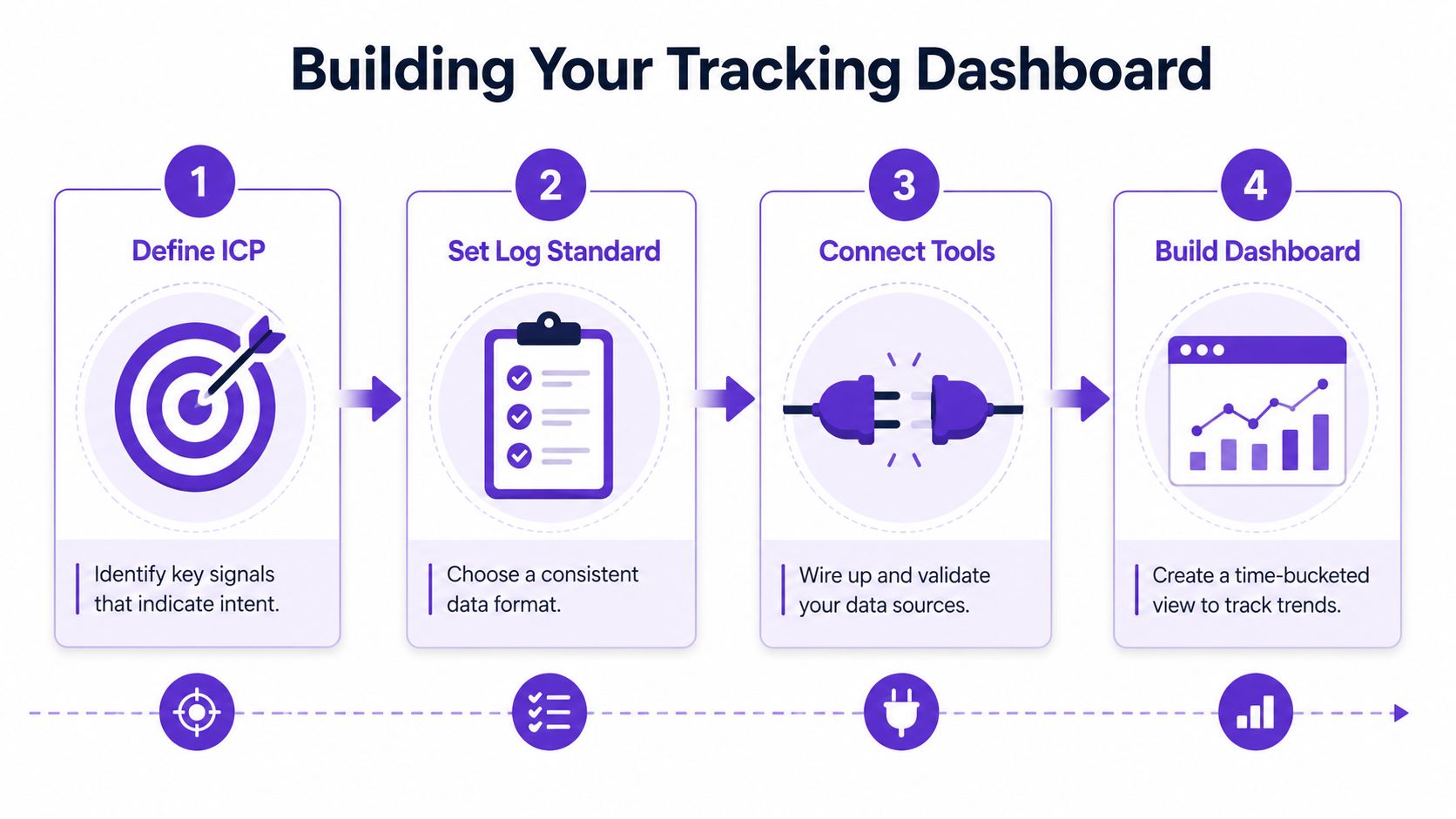
A simple workflow keeps this from turning into a science project. Start with the signals you care about, wire them into the CRM, and build a dashboard that shows trend lines instead of just totals. If your data comes from multiple systems, CRM enrichment helps keep fields usable rather than suspiciously blank. That matters when you are trying to compare a real buying pattern with the kind of half-finished logging that makes managers squint at spreadsheets and guess.
Practical rule: a dashboard should tell a manager what to coach this week, not just what to admire at month-end.
Common Sales Tracking Mistakes to Dodge
The first mistake is vanity logging. That's when the team treats activity volume like a moral virtue, as if enough calls automatically create pipeline. They don't. They create paperwork unless the touches are relevant, timely, and tied to buyer context.
The second mistake is ignoring context. A single reply from three stakeholders in a real deal is worth far more than a pile of solo emails to one person who never forwards anything to anyone. That's the hidden weakness in many tracking systems, they see activity, but they don't see signal strength. Good tracking measures whether the buying group is widening, not just whether the rep stayed busy.
The third mistake is relying on rep-reported totals without checking completeness. If the CRM only reflects what people felt like logging after lunch, the data has already been compromised. One reporting framework explicitly calls out the percentage of activities properly logged in the CRM compared with activities detected or expected, and it also introduces activities per selling hour as a normalized efficiency metric. That's a far better way to compare reps than raw totals alone, because it stops rewarding the person with the loudest keyboard.

The fix for all three mistakes is the same. Track the right fields, score the quality of the interaction, and compare activity against outcome instead of worshiping effort in isolation.
How RoverLead AI Elevates LinkedIn Tracking
LinkedIn is where a lot of “maybe later” buyers tell on themselves. They like a post, comment on a competitor's thread, or start engaging with a creator in your space long before they answer a cold email. That's exactly the kind of behavior sales activity tracking should capture, because it's the digital equivalent of someone leaning closer at a conference booth.
RoverLead AI turns that behavior into a live intent feed. After a short ICP setup, it watches buying signals across your niche, competitors, and relevant experts, then surfaces context with an AI-written opener. The important distinction is that it tracks engagement as movement, not just as vanity interaction. If you're comparing manual prospecting to a more systematic approach, the LinkedIn lead generation playbook gives a useful backdrop for why timing matters so much.
The screenshot below gives you a sense of where this fits in the workflow.
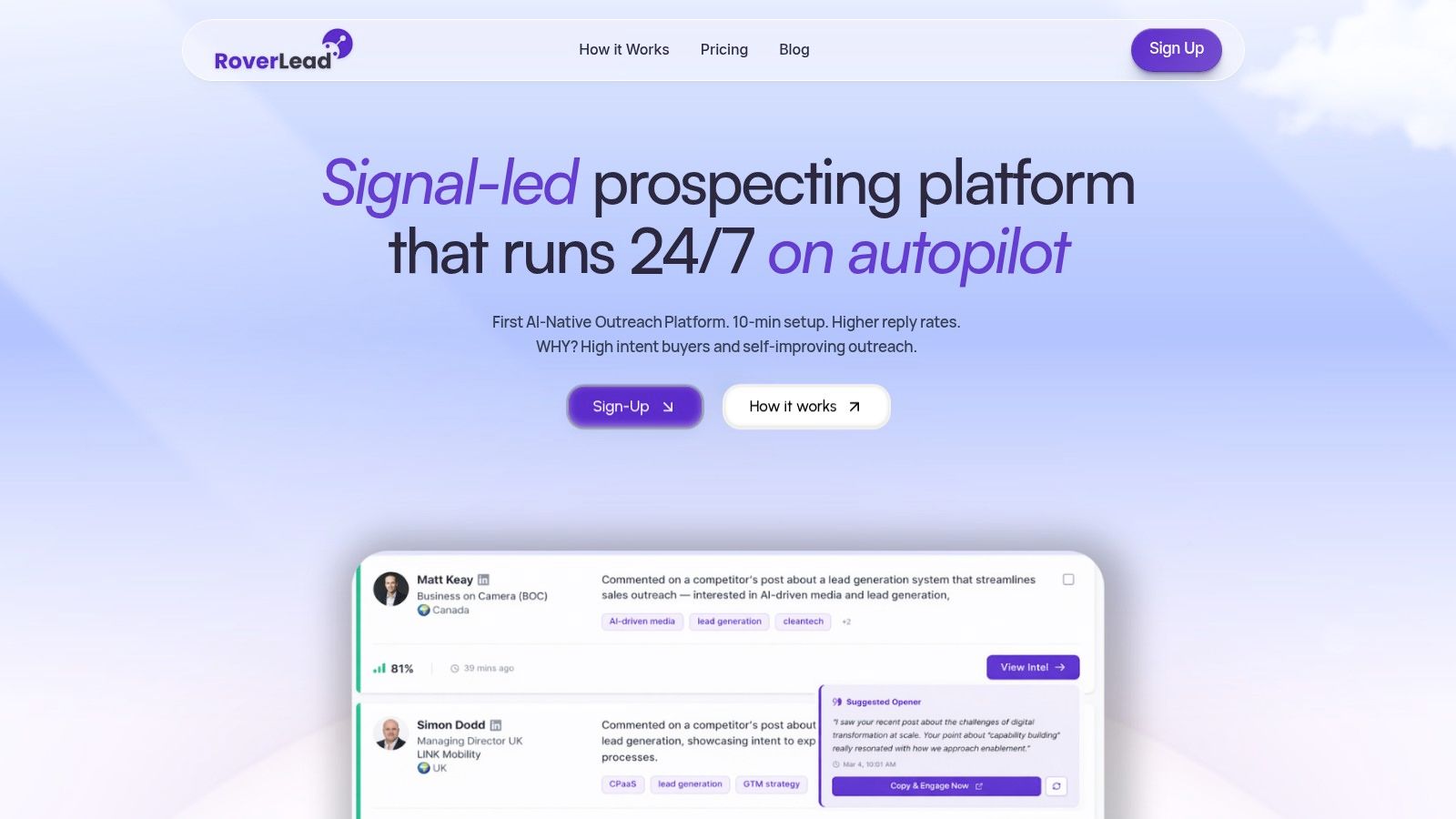
The reason this matters is practical, not mystical. Manual Sales Navigator digging is fine when the calendar is slow and patience is endless. Autonomous intent tracking is better when you want to spend less time hunting and more time sending the right message to the right account at the right moment.
Wrapping Up Your Tracking Strategy
If your tracking only counts activity, you're still flying with half the instruments turned off. The stronger approach is to measure signal strength, pair volume with outcomes, and review data on a daily, weekly, and monthly rhythm. That's the difference between looking active and advancing deals.
Keep five things in mind. Define the touchpoint fields, score context, watch stage progression, check data completeness, and build a dashboard people will open. If LinkedIn intent matters in your motion, tools like RoverLead AI can help surface the right accounts sooner, which keeps the tracking tied to action instead of archaeology. For more on connecting activity to forecast discipline, forecast accuracy improvement is worth a read.
Frequently Asked Questions About Sales Activity Tracking
How do I start with zero infrastructure?
Start with one workflow and three fields. Track calls, emails, and meetings, then add recipient role, response flag, and next step. A messy system with a clear habit beats a perfect system nobody uses.
Should I track LinkedIn likes?
By themselves, likes are weak signals. They become more useful when they sit next to comments, repeated engagement, or engagement from the right stakeholder in the buying group.
How do I attribute multi-thread signals?
Use the account as the unit of analysis, then record who engaged and in what role. That lets you see whether the conversation is widening across decision-makers instead of staying trapped in one inbox.
What CRM fields are essential?
At minimum, capture touch type, contact role, outcome, next step, and timestamp. If the field can't help you diagnose progress later, it's probably decorative.
How often should dashboards be reviewed?
Daily for activity movement, weekly for conversion and acquisition cost, monthly for cycle length and revenue per deal. That cadence matches the time-bucket logic used in stronger reporting frameworks.
How does RoverLead compare to manual logging?
Manual logging records what already happened. RoverLead AI helps surface LinkedIn engagement signals so reps can act on buying motion while it's still warm, instead of discovering it after the opportunity has cooled off.
How do you avoid rep burnout from tracking?
Automate as much logging as possible and keep the required fields tight. Reps don't hate accountability, they hate admin cosplay.
What does qualitative scoring look like in practice?
Score the touch by who replied, how quickly they replied, whether the thread grew, and whether the conversation moved toward a next step. A long thread with the wrong person still loses to a short, high-signal exchange with a real buyer.
How do I pitch this to leadership?
Tie tracking to pipeline health, forecasting, and coaching. Leaders care less about activity theater and more about whether the team can see stalled deals earlier and move faster where it counts.
How do I measure success in 90 days?
Look for cleaner logging, better visibility into who is engaging, and clearer separation between busywork and meaningful motion. If your dashboard starts helping managers coach specific behaviors instead of applauding volume, you're on the right track.
RoverLead AI helps sales teams turn LinkedIn engagement into usable intent, so your outreach lines up with real buying motion instead of guesswork. If you want sales activity tracking that emphasizes context, timing, and signal strength, visit RoverLead AI and see how it fits into your prospecting stack.