
LinkedIn for Prospecting: A Playbook That Books Meetings

LinkedIn prospecting rarely breaks at the connection request. It breaks afterward. Large benchmark datasets report that 80% of accepted connections never send a reply, while only about 2.0% of accepted connections become booked meetings (Reachium's 2026 benchmark analysis). A separate benchmark covering more than 15 million LinkedIn contacts found an overall reply rate of 7.2%, with results varying by industry (Belkins benchmark coverage).
That changes how you should use LinkedIn for prospecting. More connection requests won't repair a weak post-acceptance experience. The better play is to identify buyers showing relevant intent, give them a credible reason to respond, and measure the path from acceptance to qualified conversation.
Table of Contents
Why Most LinkedIn Prospecting Fails
Sales teams often treat LinkedIn prospecting as a contact-acquisition problem. They build broad lists, send connection requests, celebrate acceptance, then struggle to turn that acceptance into a business conversation. The bottleneck sits after the connection. A roughly 7% reply rate is average, not exceptional, according to Belkins' analysis of 15M+ contacts, so adding connection volume will not fix irrelevant follow-up (Belkins benchmark coverage).
LinkedIn prospecting is the full workflow of identifying, engaging, qualifying, and booking meetings with target buyers through profile activity, content, and direct outreach. A connection is only an opening. It becomes a prospecting result when the person engages in a relevant business conversation.
Why the channel still matters
LinkedIn remains useful for B2B because buyers often review a seller's profile before accepting a call, decision-makers can be reached without relying entirely on gatekeepers, and engagement creates visible context. A post comment, profile view, job change, or discussion of a business problem can reveal more than a static title or company field.
The channel's scale supports that role. 93% of B2B marketers use LinkedIn, 40% rank it as their number one lead-generation channel, and LinkedIn is credited with generating about 80% of B2B social media leads, with a 2.74% visitor-to-lead conversion rate (LinkedIn B2B benchmarks).
Practical rule: Treat an accepted connection as the start of qualification, not the end of prospecting.
The recurring failure pattern is clear: loose targeting, a generic connection note, an immediate product pitch, and no useful follow-up after the first message is ignored. Prioritize behavioral context with this guide to identifying buying signals in sales. Each tactic that follows should improve post-acceptance relevance and give the reply rate a realistic path toward, rather than above, the 7% benchmark.
Set Your Profile and Funnel Before You Source Anyone
A connection can be accepted and still produce no reply. The bottleneck is usually post-acceptance conversion, not connection volume. Before sourcing, make your profile answer three questions quickly: who do you help, what problem do you understand, and what should the visitor do next? Every element should make a relevant reply more likely, with the 7% benchmark as a practical reference rather than a promise.
Build the buyer-facing profile
Write the headline for the buyer, not for your internal org chart. State the audience and business outcome in plain language. Your banner should reinforce that positioning, not become a collage of logos and buzzwords. Follow these LinkedIn background image dimensions so the message remains readable. Use the About section to describe the buyer's problem and your way of addressing it. The Featured section can hold useful proof, such as a practical guide, relevant recording, or focused landing page.
Frame experience around buyer consequences. “Managed outbound” gives little context. Explain the decisions, constraints, and operating problems you handle, so a target buyer can recognize their situation. If you publish regularly, use creator features when they support the outreach strategy. A profile full of content still needs a clear next step.
Connect the profile to a simple funnel
Choose one low-friction CTA and repeat it in the About section, Featured section, and relevant content. Ask for a reply, comment, or short conversation. Multiple competing actions make post-acceptance decisions harder.
Set up three operating controls:
A dedicated destination: Use a focused landing page or scheduler that matches the message.
A CRM status field: Tag people as invited, accepted, engaged, qualified, meeting booked, or closed.
A review habit: Read the profile as a skeptical buyer who received your message today.
Sales Navigator supports activity tracking for searches, profile views, saved leads, saved accounts, lists, and InMails, helping teams move from browsing to structured prospecting (LinkedIn Sales Navigator activity tracking). Review those signals alongside replies, rather than treating firmographic fit as proof of intent. Before sourcing, confirm that a target buyer can understand your offer and next step without speaking with you. If not, adding connections only increases the audience for an unclear message.
Static Lists Versus Intent Signals
A static list is useful because it's predictable. You can define a market by role, industry, company size, or account ownership, then work through it systematically. The weakness is timing. A person can match your ideal customer profile perfectly and still have no reason to respond this week.
Intent signals add timing and context. They show that someone is interacting with a topic, company, problem, or change connected to your offer. That doesn't guarantee a buying process, but it gives you a more credible starting point than a title alone. See this explanation of what intent data means before building a scoring model.
Dimension | Static Firmographic List | Intent-Driven Sourcing |
|---|---|---|
Primary input | Role, industry, account, company profile | Engagement, activity, change, or problem signal |
Main strength | Consistent coverage and easy territory planning | Better timing and more relevant openers |
Main weakness | Often ignores current priorities | Requires monitoring and judgment |
Best use | Core account coverage | Prioritizing active buyers |
Outreach style | Hypothesis-led | Signal-led and contextual |
Signals worth watching
Target-account engagement: A buyer comments on your post or a relevant industry discussion. Reference the topic they engaged with, not merely the fact that they clicked.
Competitor or category activity: Comments on competitor content can reveal active evaluation, frustration, or curiosity. Avoid pretending you know their buying stage.
Profile views: A view from a relevant buyer can justify a soft profile-based opener, especially when paired with another signal.
Role changes: A new leader may be reviewing inherited processes. Congratulate them, then connect the likely priority to a useful question.
Hiring activity: New hiring around an adjacent function can suggest operational change. Use the job description or team expansion as context.
Funding or expansion announcements: These can indicate movement, but they aren't proof of need. Ask about the operational consequence rather than leading with congratulations alone.
Content downloads and events: Follow up on the subject matter, not the tracking event. Nobody enjoys being told their webinar attendance has been logged.
Niche group activity: Group discussions can surface language buyers use to describe the problem. Mirror that language carefully and contribute before pitching.
Use a static core list for coverage, then run a regular intent sweep for priority accounts. The blended model prevents two common errors: waiting passively for signals across the entire market, or sending the same message to everyone who shares a job title.
Cadence and Outreach Templates That Earn Replies
The bottleneck is post-acceptance conversion, not connection volume. Expandi's benchmark set, based on 13.2 million data points, reported 28.5% connection acceptance, 3.0% connection-note reply, and 10.4% post-connection message reply (Expandi benchmark coverage). Treat those figures as directional. The operating target is roughly 7% post-acceptance reply, so every follow-up should use an observable intent signal rather than static firmographics alone.
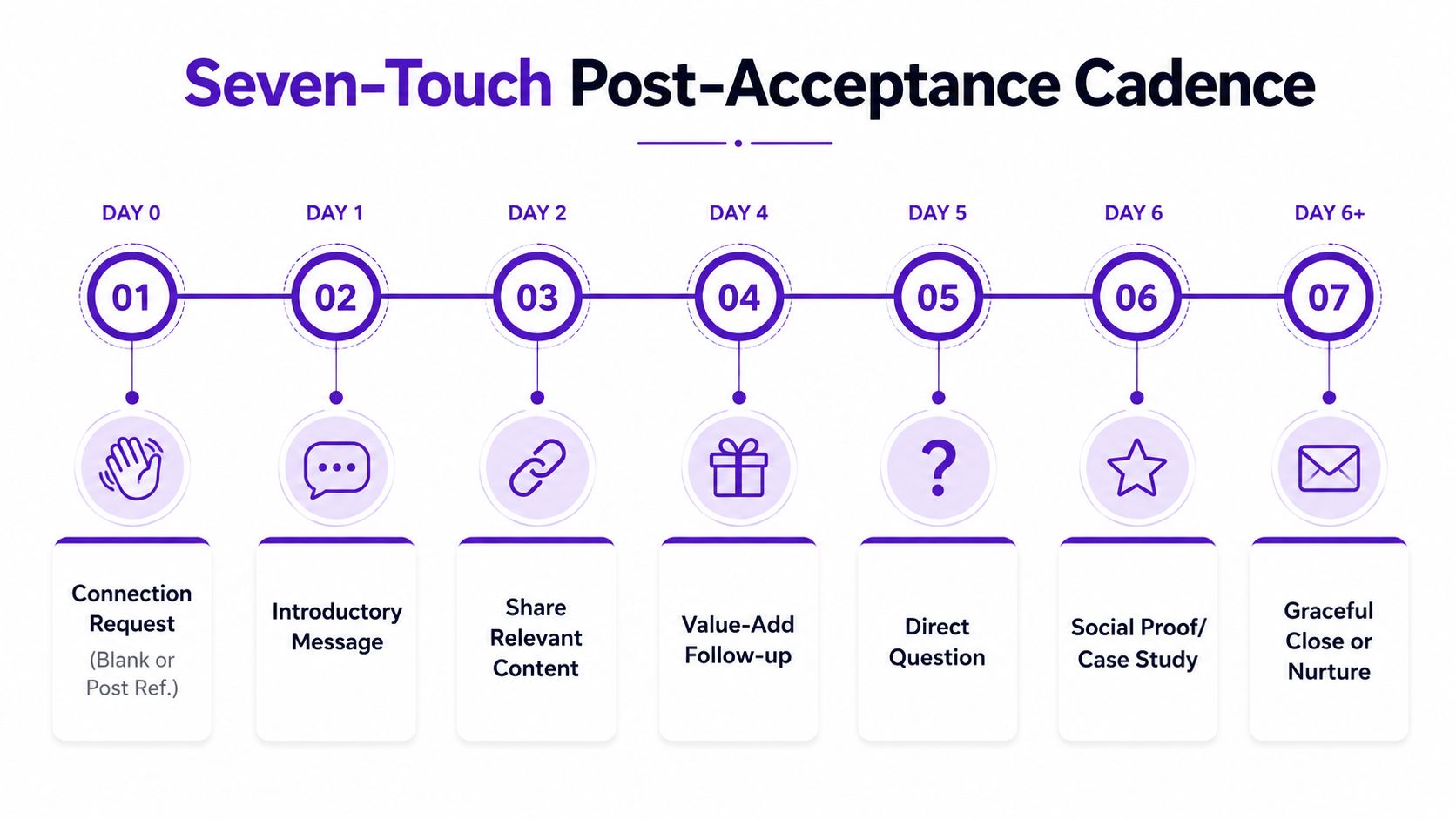
A practical seven-touch sequence
Day 0, connect. Send a blank request when your profile and shared context provide enough relevance. Otherwise, write one specific line about a post, role change, or company trigger. Do not pitch. Keep the note under 300 characters, consistent with benchmark guidance for concise personalization (InMail response benchmarks).
“Your comment on sales capacity planning was sharp. I'm comparing how RevOps teams handle the handoff between hiring and pipeline. Happy to connect.”
Day 1, add a soft value touch. Share one relevant observation or resource. “Saw your team is hiring in RevOps. This short checklist covers handoff issues that often appear during expansion. Useful, or not a current priority?”
Day 3, ask a pattern-interrupt question. Tie it to the signal: “When new sellers join, does your team struggle more with lead quality or follow-up consistency?”
Day 7, ask permission for a short call. Make the next step concrete: “If that's on your radar, open to a 15-minute comparison next week? I have Tuesday morning or Thursday afternoon.”
Day 10, close the loop. “I'll close this out so I don't become part of your inbox furniture. If improving outbound follow-through is relevant later, should I send the checklist instead?”
Keep follow-ups below 1,200 characters and personalize around one observable signal. The message should depend on something the prospect did, posted, changed, or investigated. A first name alone does not create relevance.
For a warm lead who engaged with your content: “Thanks for weighing in on the post about handoff delays. Your point about data quality stood out. Is that a current issue for your team, or was it a general observation?”
For a stalled conversation after 60 days: “Revisiting this because the topic came up in a recent client conversation. Has [specific problem] become more relevant, or should I leave it parked?”
Use these LinkedIn message templates for additional variations, then adapt each one to the prospect's signal.
Reading the Numbers From Connect to Meeting
Funnel review should locate the conversion leak, not reward connection volume. Segment, timing, market, and message quality change the baseline, but the practical target after acceptance is roughly 7% replies. Industry results vary, so use benchmarks as context rather than quotas (Belkins benchmark coverage).
Funnel Stage | Realistic Benchmark | Diagnostic Fix |
|---|---|---|
Connection request sent | Volume baseline | Keep targeting focused on fit and current intent signals |
Acceptance rate | 27% to 29% benchmark range (Reachium) | If lower, improve profile positioning and request context |
Post-acceptance reply | Around 7% overall benchmark | Tie the first message to the buyer's problem and observable trigger |
Qualified conversation | Track your own share of replies | Confirm problem, urgency, and fit before proposing a call |
Meeting booked | About 2.0% of accepted connections in large benchmark data | Make the call ask specific and connected to acknowledged pain |
Review the funnel weekly, starting with its weakest stage. Low acceptance usually points to poor targeting, weak positioning, or requests detached from intent. Low post-acceptance replies mean the value touch needs work. If qualified conversations do not become meetings, shorten the CTA and give the buyer a clear reason to talk now.
The useful comparison is between intent-led and static outreach. A role or company filter can create a list, but it cannot explain why that person should respond today. Prioritize job changes, relevant posts, hiring activity, product research, or engagement with a problem you address. Then compare reply rates by signal, not only by industry or company size.
Seasonality and geography can shift results. A 15.1 million-touchpoint study reported a 7.9% reply rate in April and 6.3% in September, with the US at 6.0%, the UK at 6.1%, Canada at 7.1%, and Australia at 6.4% (LinkedIn outreach state report). Treat those figures as context. A slower month still shows where post-acceptance conversion is leaking.
Compliance and Daily Habits That Protect Your Account
LinkedIn publishes operating boundaries through its product experience and account policies, but platform limits aren't a target. The commonly cited ceilings for established accounts are roughly 100 connection requests, 50 InMails, and 200 messages per day, while safer warming targets are 20 to 30 connections and 40 to 60 messages per day. Treat those figures as conservative operating guidance, not permission to turn your account into a vending machine (LinkedIn prospecting statistics and tool coverage).
Keep behavior human
Avoid scraping, automation that mimics human clicks, and mass blasts with identical wording. LinkedIn's Sales Navigator Usage Reporting lets admins view activity for the last 30 days, last 7 days, or a selected month, filter by user and tag, and export a CSV (LinkedIn Usage Reporting). Use that visibility to coach quality and pacing, not to reward the rep who generates the most noise.
Pause when behavior gives you a reason to pause. If a prospect views your profile twice without replying, re-engage with useful content instead of sending another pitch. If the second message gets no reaction, don't send a third message immediately. Move the contact into nurture or find a stronger signal.
A daily routine keeps judgment ahead of volume:
Review yesterday's replies first: Route positive, neutral, and negative responses before sourcing new people.
Respond within four business hours: Speed matters most when the buyer has just engaged.
Flag warm accounts in the CRM: Record the signal and next action before ending the session.
Watch account quality: Keep acceptance healthy and spam reports near zero by removing weak segments quickly.
The safest cadence is one a human can explain. If you can't describe why a specific person received a message, the list isn't ready.
Measure, Optimize, and Your 30-Day Plan
Track metrics that connect LinkedIn activity to pipeline. Weekly accepted connection rate shows whether your profile and targeting earn attention. Reply rate shows whether the post-acceptance message has relevance. Positive reply rate, meetings booked per connections sent, and sourced pipeline value reveal whether those replies represent commercial progress.
Use each KPI to choose one action:
Low acceptance: Tighten the audience and rewrite the connection context.
Low replies: Tie the first follow-up to a current trigger instead of your product.
Low positive replies: Revisit the problem statement and remove broad claims.
Low meeting conversion: Offer a shorter, clearer call with a specific reason to attend.
Low pipeline contribution: Compare signal sources and stop investing in segments that produce activity without qualified conversations.
A focused 30-day operating plan
Week 1: Rework the headline, banner, About section, Featured section, and CTA. Ask someone outside sales to inspect the profile and explain what they think you sell.
Week 2: Build a 200-person intent-sourced list and launch an 8-touch cadence. The list size and cadence are operating targets for this plan, not performance benchmarks. Record the exact signal behind every prospect.
Week 3: Audit replies, remove underperforming message variants, and test one new opener. Keep the test narrow so you can identify whether the change affected relevance, not just volume.
Week 4: Review the acceptance-to-meeting funnel and double down on the signal source that produces the strongest qualified conversations. If content engagement wins, prioritize it. If role changes perform better, make them part of daily sourcing.
LinkedIn prospecting compounds through signal quality and follow-through, not through sending more requests. The best system makes the next conversation easier to justify, easier to personalize, and easier for the buyer to answer.
RoverLead AI turns LinkedIn engagement around your ICP, competitors, creators, and topics into contextual leads with AI-written openers for signal-led outreach. Visit RoverLead AI to see how a daily intent feed can help your team spend less time on static list research and more time on relevant conversations.