
Lead Generation Automation: B2B Workflow Guide

You open LinkedIn, pull a list from Sales Navigator, fire off connection requests, and wait for the calendar to fill. Instead, you get silence, a few polite brush-offs, and one person asking if this message was “written by a robot having a rough morning.”
That's the daily grind for a lot of SDRs and founders. The problem usually isn't effort. It's the workflow. Static list pulls only tell you who someone is on paper. They don't tell you whether that person is paying attention right now, discussing a problem, or circling vendors. On a platform that drives 89% of all B2B lead generation efforts according to Cirrus Insight's LinkedIn lead generation statistics, that gap matters a lot.
The teams getting meetings from LinkedIn aren't just automating outreach. They're automating timing and context. They watch for live signals, then step in when a buyer is already leaning into the topic. If you're still running generic list-first outreach, it's worth rethinking your whole LinkedIn lead generation process.
Table of Contents
Introduction to Automated LinkedIn Prospecting
A bad LinkedIn day usually starts with good intentions. A rep exports a list of “ideal buyers,” drops them into an automation tool, writes one broad message for all of them, and assumes volume will sort out the rest. By Friday, the dashboard shows activity. The pipeline doesn't.
That setup fails for a simple reason. Firmographics are not intent. A VP at the right company can still be the wrong prospect today. Meanwhile, someone commenting on a competitor's post, engaging with a niche creator, or discussing implementation headaches is often far closer to a meeting than the polished static list suggests.
Practical rule: If your workflow can't explain why now for a prospect, it's probably just automating guesswork.
Automated LinkedIn prospecting works when it behaves less like a mail merge and more like a sharp rep. It notices a live cue, matches that cue to the ICP, and gives the seller enough context to send a message that doesn't feel parachuted in from nowhere.
Defining Your ICP and Intent Signals
Most lead generation automation breaks before the first message goes out. The issue usually shows up earlier, when teams define the ICP in broad, flattering language like “B2B tech companies with growth potential.” That's not an ICP. That's a wish.
A workable ICP needs two layers. The first is fit. Industry, company type, buying role, team structure, and the kind of problem your offer solves. The second is behavior. What a person does on LinkedIn that suggests they may care now.
If your ICP still needs work, tighten it around concrete buying conditions, not vague demographics. A simple place to start is this guide on what ICP means in business.
Separate fit signals from live signals
Static criteria help you avoid junk. Intent signals help you avoid bad timing.
Use fit to answer questions like:
Role fit: Is this person close enough to the buying problem to care?
Company fit: Does the business model, maturity, or service motion match your offer?
Disqualification: Which titles, segments, or situations should never enter the workflow?
Then define a small set of LinkedIn triggers that matter:
Competitor interaction: Comments or reactions on a competitor's post often signal active category awareness.
Creator engagement: If prospects regularly engage with trusted voices in your niche, they're telling you what problem set is on their mind.
Commercial language: Mentions of pricing, demos, implementation, hiring, or tooling discussions often carry more weight than a casual like.
Profile and content behavior: Repeated topic engagement usually matters more than one isolated action.
According to Saleshandy's lead generation statistics, companies using AI-driven lead scoring see 50% more sales-ready leads and 60% lower acquisition costs by prioritizing behavioral data over static lists. That lines up with what most sales teams see in practice. Behavioral cues don't just create more leads. They create leads a rep can work without rolling their eyes.
Keep the scoring logic simple at first
Don't build a giant scoring model on day one. Start with a handful of positive signals and a few disqualifiers. Then review whether the surfaced leads produce conversations.
A practical first pass looks like this:
Define must-have ICP rules so weak-fit accounts never enter the queue.
Assign higher weight to active intent such as meaningful comments or topic-specific engagement.
Use manual review early so reps can spot false positives before scale turns them expensive.
Add exclusions for students, recruiters, vendors, competitors, and low-relevance roles.
The cleanest automation still needs judgment. Good systems reduce rep effort. They don't replace common sense.
Comparing Static vs Intent-Based Workflows
The market's shift toward automation is real, but the useful question isn't whether to automate. It's what you're automating. According to Cirrus Insight's sales automation market analysis, the global sales automation market grew from $7.8 billion in 2019 to $16 billion in 2025. More software isn't the win by itself. Precision is.
Static lists feel efficient until reps start working them
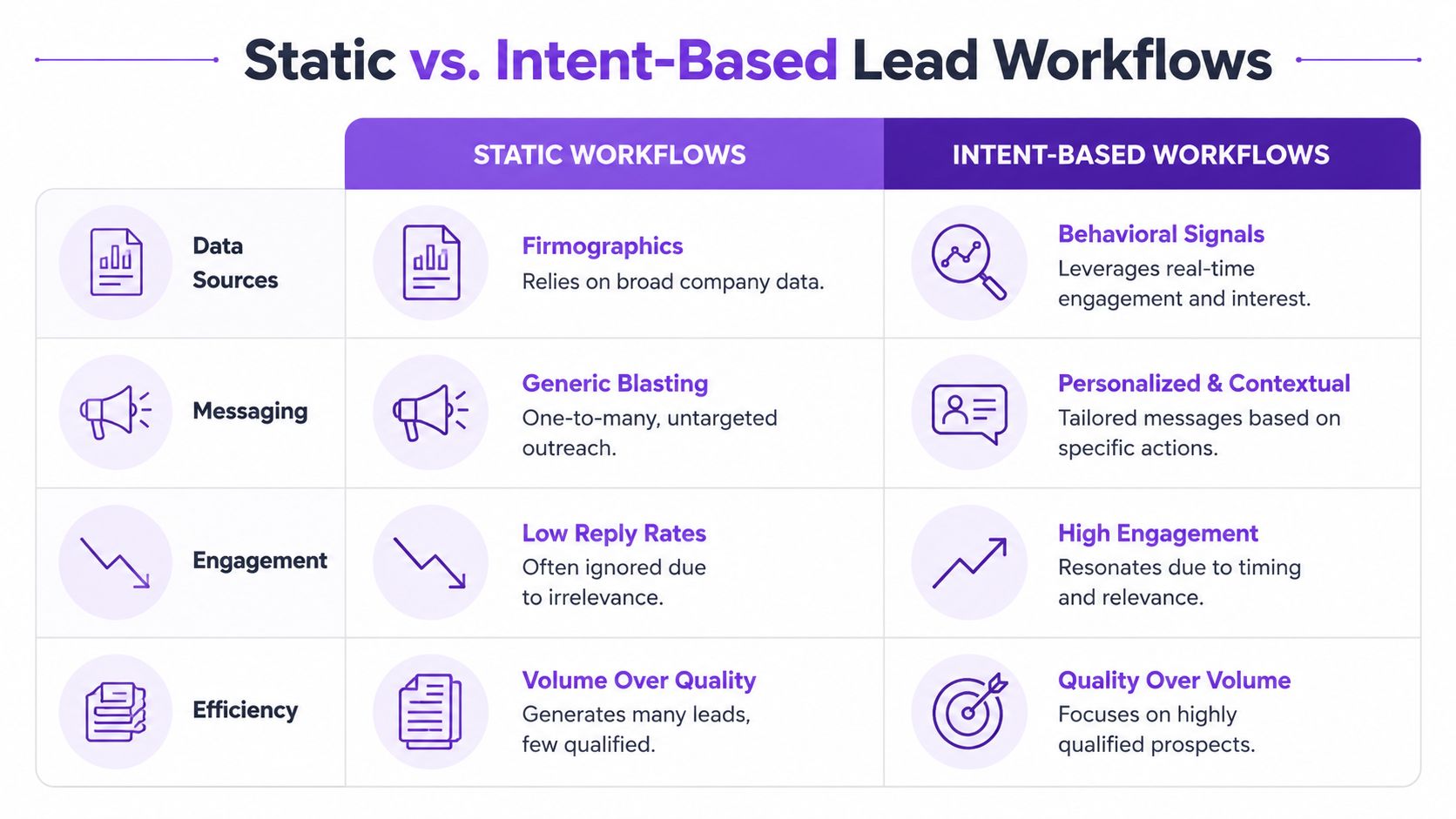
Static firmographic workflows look tidy in a spreadsheet. They also create a lot of busywork. Reps spend time personalizing around information that isn't tied to current need, and messages end up sounding clever but irrelevant.
Intent-based workflows are messier to design at first. You need signal sources, scoring logic, and clear compliance boundaries. But once they're running, the seller starts with context instead of cold hope. That's the whole game in intent-based marketing.
Static vs Intent-Based Automation Comparison
Static vs Intent-Based Automation Comparison | Static Firmographic | Intent-Based |
|---|---|---|
Data source | Company and profile attributes | Real-time behavioral engagement plus ICP fit |
Message angle | Generic personalization from public profile details | Context built around what the prospect actually engaged with |
Rep workflow | Large lists, high filtering burden | Smaller queues, higher relevance per lead |
Compliance risk | Higher when teams push volume and over-message | Lower when timing and relevance guide outreach |
Setup difficulty | Easier to launch | Harder to design well |
Long-term usefulness | Degrades as lists stale | Improves when signals and scoring get refined |
The trade-off is straightforward. Static systems are easier to start. Intent systems are easier to trust.
Designing a LinkedIn Automation Workflow
A good LinkedIn automation workflow should feel boring in the best way. Clean inputs. Clear triggers. Tight handoffs. Nothing flashy, nothing spammy, nothing that needs daily heroics.
Start with validation before automation
Before you automate anything, validate your sequence manually. This is the part many teams skip because software feels more fun than discipline. It's also where waste begins.
Martal notes that a validated 6-to-8-touch multi-channel sequence is the prerequisite for automation success, and skipping manual validation leads to wasted spend in their guide to automated lead generation. That advice holds up. If a sequence doesn't work when a rep sends it deliberately, software won't rescue it. It'll just help you fail faster.
Run the sequence manually against a narrow ICP slice first. Watch which opening gets replies, which touch creates profile views, and which signals correlate with meetings.
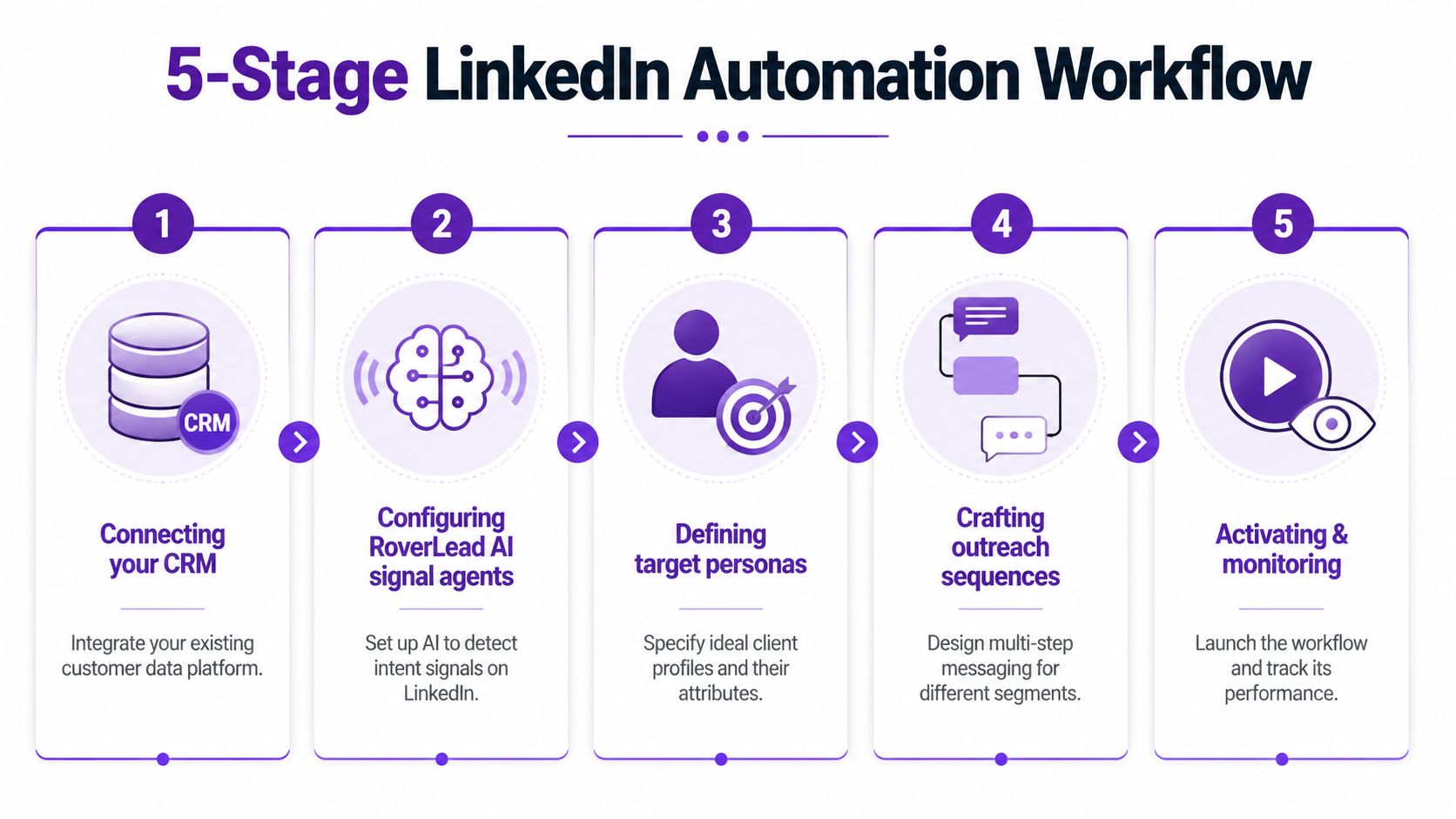
Build the workflow in five parts
Here's the operating model I'd use for signal-based lead generation automation on LinkedIn:
Connect the CRM
Your CRM needs to receive more than names and titles. Pass in the signal context too. “Commented on competitor post about pricing” is far more useful than “Marketing Director at SaaS company.”Configure signal monitoring A tool proves its value through effective signal monitoring. One option is LinkedIn auto message workflows tied to signal detection, where the system surfaces people engaging with relevant creators, competitors, and topics. Used carefully, that setup lets reps respond to timely behavior instead of working stale lists.
Define personas and exclusions
Don't just state who you want. State who should never be contacted. Bad routing usually comes from vague exclusions, not weak software.Write opener logic by signal type
A prospect who commented on a competitor pricing discussion needs a different opener than someone who engaged with an educational post from an industry creator. Don't force one script across all triggers.
For a visual walkthrough, this video gives a useful overview of how to structure the workflow:
Monitor and sync engagement back into pipeline stages
The workflow shouldn't stop at message sent. Profile views, accepted connections, replies, and follow-up interactions should all feed back into the record so reps know what happened before they step in manually.
Automation should handle detection, routing, and prep work. Reps should handle judgment, conversation, and deal movement.
That division keeps the system compliant and useful. Once the tool starts pretending it can replace human nuance on LinkedIn, things get weird fast.
Crafting Messaging Templates and Timing
Most bad outreach fails before anyone reads line two. The opener is vague, the timing is random, and the message sounds like it was written for a buyer-shaped object.

Write messages that sound like a person noticed something
Signal-based messaging works because it starts from observed context. Keep it simple. Short beats fancy.
A few template patterns that tend to work better than generic pitch slaps:
Comment-driven opener: “Saw your comment on the post about pricing friction. Curious if that's something your team is actively tackling or just tracking for later.”
Topic-engagement opener: “Noticed you've been engaging with a few posts on outbound quality. Are you testing a new motion or just cleaning up an old one?”
Competitor-adjacent opener: “You caught my eye because you were active in a conversation around [topic]. Usually that means the problem is at least on the radar.”
What backfires:
Fake familiarity: Pretending you've followed their work for years when you noticed them eight minutes ago.
Over-personalized trivia: Mentioning college mascots, hobbies, or city weather. That's not relevance. That's digital lurking.
Pitching on touch one: If your first message reads like a proposal, most buyers will leave it there to fossilize.
Use content and landing pages to catch intent cleanly
Not every lead should go straight into a meeting ask. Some should move into a content path that lets you capture and qualify interest without forcing the conversation.
According to Improvado's lead generation guide, gated assets like whitepapers convert at 20–30%, and optimized landing pages with a single CTA average 23%. That makes them useful support assets inside a broader automation system, especially for mid-intent prospects who aren't ready for direct outreach.
A simple rhythm works well:
Connection request first when the signal is light
Contextual follow-up after acceptance
Helpful asset when the buyer shows curiosity but not urgency
Meeting ask only after engagement suggests real interest
That sequence feels more like a conversation and less like a mugging.
Tracking KPIs Optimizing and Avoiding Pitfalls
A workflow isn't good because it launched. It's good if reps keep using it, managers trust the output, and pipeline quality improves over time.
What to measure once the workflow is live
You don't need a huge dashboard. You need a useful one.
Start with operational signals that tell you whether the system is surfacing real opportunities:
Reply quality: Are replies positive, neutral, or annoyed?
Meeting progression: Which signals and openers lead to booked calls?
Lead acceptance by reps: If reps ignore surfaced leads, the model has a trust problem.
Pipeline movement: Do signal-sourced leads move forward faster than list-sourced ones?
Sales teams that measure and iterate tend to get results faster. The Starr Conspiracy's AI lead generation benchmarks note that AI-powered lead gen delivers 73% more qualified leads in six months. The lesson isn't “turn on AI and wait.” It's that review loops matter.
Mistakes that quietly wreck performance
The ugliest failures in lead generation automation usually look harmless at first.
“Set and forget” is how teams end up sending polished nonsense to the wrong people.
Watch for these problems:
Dirty records: Duplicates, missing ownership, and stale contacts distort routing and reporting.
No disqualification logic: Without exclusions, low-intent or irrelevant leads consume rep time.
One-message-fits-all sequencing: Different signals need different follow-up paths.
Ignoring compliance boundaries: If the workflow pushes volume over relevance, it will eventually create platform trouble or buyer fatigue.
No manual audit cadence: Reps should review surfaced leads regularly and tag false positives so the workflow improves.
Optimization is rarely dramatic. It's mostly pruning, scoring tweaks, and deleting steps that looked smart in a workshop but flop in the wild.
FAQ on Lead Generation Automation
1. What is lead generation automation on LinkedIn?
It's the use of tools and workflows to identify prospects, score relevance, and trigger outreach or follow-up without doing every step by hand.
2. Is static list building still useful?
Yes, for account coverage and market mapping. No, as the main trigger for outreach timing.
3. What makes signal-based automation different?
It reacts to behavior such as comments, engagement, and topic interest instead of relying only on job title and company data.
4. How many touches should a sequence include?
Use a validated multi-touch sequence rather than guessing. Keep the touches relevant and spaced with intent.
5. Should every prospect get a direct pitch?
No. Many are better served by a contextual message or useful content before any meeting ask.
6. How do I keep automation compliant?
Prioritize relevance, avoid spammy volume, and make sure a human reviews workflow logic and outputs.
7. What should reps personalize first?
The reason for outreach now. Timing beats decorative personalization.
8. When should AI write the opener?
After the workflow has enough context from a real signal. Otherwise, it just generates polished generic copy.
9. How long does it take to see traction?
Usually faster when the team measures and iterates consistently instead of launching and hoping.
10. What's the biggest mistake teams make?
Automating a weak process. Software amplifies what's already there, good or bad.
If your team wants to stop grinding through static lists and start working live buying signals, RoverLead AI is built for that workflow. It monitors LinkedIn engagement, matches signals to your ICP, and gives reps context plus an AI-written opener so outreach starts from real interest instead of cold guesswork.