
How to Monitor Competitor Activity Without Losing Your Mind

Monday starts with a familiar little disaster. An SDR has 14 browser tabs open, four Slack alerts from last week, and a pricing change buried in a competitor's website history. A prospect call begins in 25 minutes, and the rival's new feature still isn't on the battlecard.
The team technically monitors competitors. Someone subscribes to alerts. Someone else saves screenshots. Marketing maintains a dashboard that nobody opens unless a quarterly meeting forces the issue. The gap isn't data collection. It's the distance between “we track competitors” and “a seller acted on a competitor signal this week.”
This is how to monitor competitor activity without turning the sales team into unpaid research analysts. The operating rule is simple: every signal must end in a seller action within seven days, or it gets cut from the feed.
Table of Contents
The Monday Morning Signal Problem
The SDR scans the competitor's homepage again. The feature is real, the positioning is different, and the prospect's company appears in the competitor's recent customer story. None of that helps if the seller has to search three systems, interpret a raw alert, and write their own response before the call.
That failure happens because teams confuse monitoring with enablement. Monitoring produces information. Enablement changes what a rep says, whom they contact, or how they handle an objection. The first activity feels productive because it creates records. The second one moves a deal.
Practical rule: If a signal can't become a battlecard change, a prospect hook, a pricing response, or a deal-specific task, it doesn't belong in the primary feed.
The fix starts with a narrower definition of success. A competitor launch matters because it changes a live talk track. A hiring pattern matters because it may reveal a new market push worth mentioning to an account owner. A pricing-page edit matters because a seller may need to reframe total cost before the buyer does.
What the team should ask every Monday
Run the opening review around seller decisions, not around the volume of collected intelligence.
What changed? Record the observable event and its source.
Why does it matter? Tie it to a buyer, account, deal, objection, or positioning issue.
Who needs it? Name the AE, SDR, marketer, or product owner.
What happens next? Assign a specific action and deadline.
The historical shift toward formal competitive intelligence supports this operating mindset. The discipline began emerging in the 1970s, Michael Porter's 1980 book Competitive Strategy helped establish modern competitive analysis, and SCIP's founding in 1986 further institutionalized the field, as outlined in the history of competitive intelligence tools. The mature version of the discipline isn't a larger archive. It's a repeatable rhythm that puts useful context in front of sellers before a buyer asks for it.
What Competitor Monitoring Actually Means in 2026
Competitive monitoring is a sales enablement workflow first and a research workflow second. It means watching public signals, deciding which ones affect revenue conversations, and distributing the useful ones where sellers already work.
A practical stack has three tiers. Track 3 to 5 Tier 1 competitors closely, 5 to 10 Tier 2 competitors more lightly, and keep a separate watch list for emerging players, following the prioritization model described by Crayon's State of CI guidance. The exact names matter less than the discipline of limiting attention.
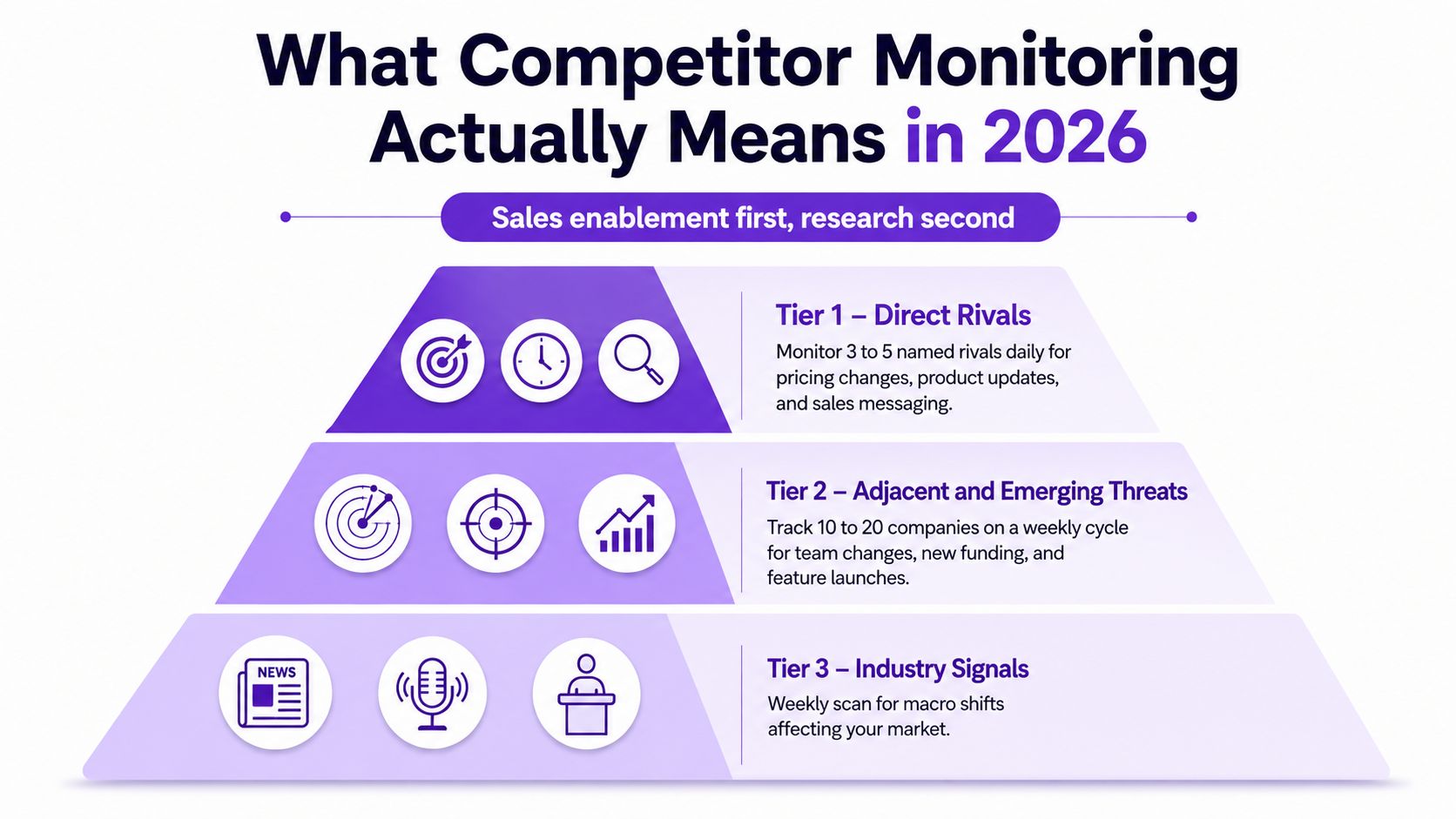
Build the three-tier stack
Tier 1, direct rivals: Monitor these companies daily for pricing changes, product updates, sales messaging, launches, and claims that could appear in active deals.
Tier 2, adjacent and emerging threats: Review these companies weekly. Look for team changes, new funding, feature releases, partnerships, and shifts into your buyer's problem space.
Tier 3, market signals: Scan the long tail through RSS, industry alerts, podcasts, conference talks, and relevant publications. This layer provides context, but it shouldn't swamp the named-competitor feed.
Use a one-page filter before adding a company:
Do they target the same ICP?
Do they sell to the same buyer?
Have they appeared in overlapping deals?
Are they showing fundraising momentum?
Are they hiring into your wedge?
The field has become mainstream. A 2020 State of Competitive Intelligence report cited by YouGov found that 94% of brands were investing in competitive intelligence, while a separate summary reported that the average number of tracked competitors rose from 25 in 2019 to 29 in 2020. More tracking doesn't automatically create more insight. The decisive question is whether a company earned attention through a real commercial event.
For that reason, the slot rule is blunt: did this competitor show up in a real deal in the last 90 days? If not, place them in the lighter tier or watch list until they produce a meaningful trigger. Teams wanting the broader distinction between research and operational intelligence can use what competitive intelligence means as a reference point.
The Four Surfaces You Need to Watch
Different surfaces reveal different kinds of movement. LinkedIn often offers dense context about people and priorities, while communities may expose buyer frustration earlier but require more judgment.
Surface | What to Track | Refresh Cadence | Best-Fit Tool |
|---|---|---|---|
Posts, follower growth, hiring, leadership moves | Weekly | Sales Navigator saved searches and Signal Agents | |
Web and product | Changelogs, feature pages, certifications, G2 reviews | Weekly | RSS and change alerts |
Pricing | Tier changes, packaging shifts, enterprise negotiation signals | Bi-weekly | Manual screenshots plus price monitoring |
Community | Reddit, Slack groups, Discord, and discussion threads | Weekly | Search operators and community Signal Agents |
Track executive posts, product announcements, hiring language, leadership changes, and repeated buyer questions. LinkedIn gives sales teams useful narrative context because a feature announcement can sit beside the positioning language and the people responsible for taking it to market.
Use Sales Navigator saved searches for named competitors and relevant roles. Signal Agents can help summarize public engagement patterns, but the output still needs a source URL and a seller action.
Web, product, and pricing
Monitor changelogs, feature pages, certification pages, release notes, review sites, and customer stories. RSS works well for stable domains, while page-change alerts help with surfaces that publish.
Pricing deserves separate handling. Take a dated screenshot whenever a monitored page changes, then compare packaging, included capabilities, usage limits, and enterprise language. Automated monitoring catches edits, but a human should verify whether the change affects a real objection.
Community
Search Reddit, Slack groups, Discord, and industry threads for complaints, “alternative to” discussions, implementation problems, and pricing pressure. Community monitoring can produce the earliest signal, but it also generates the most noise, sarcasm, stale advice, and contextless reposts. The social media listening tools guide is useful when evaluating coverage, but don't mistake broad listening for qualified intent.
Building Your Monitoring Stack From Scratch
Start with the cheapest layer that can answer your operational question. A small B2B team doesn't need an enterprise intelligence platform before it knows which signals sellers use.
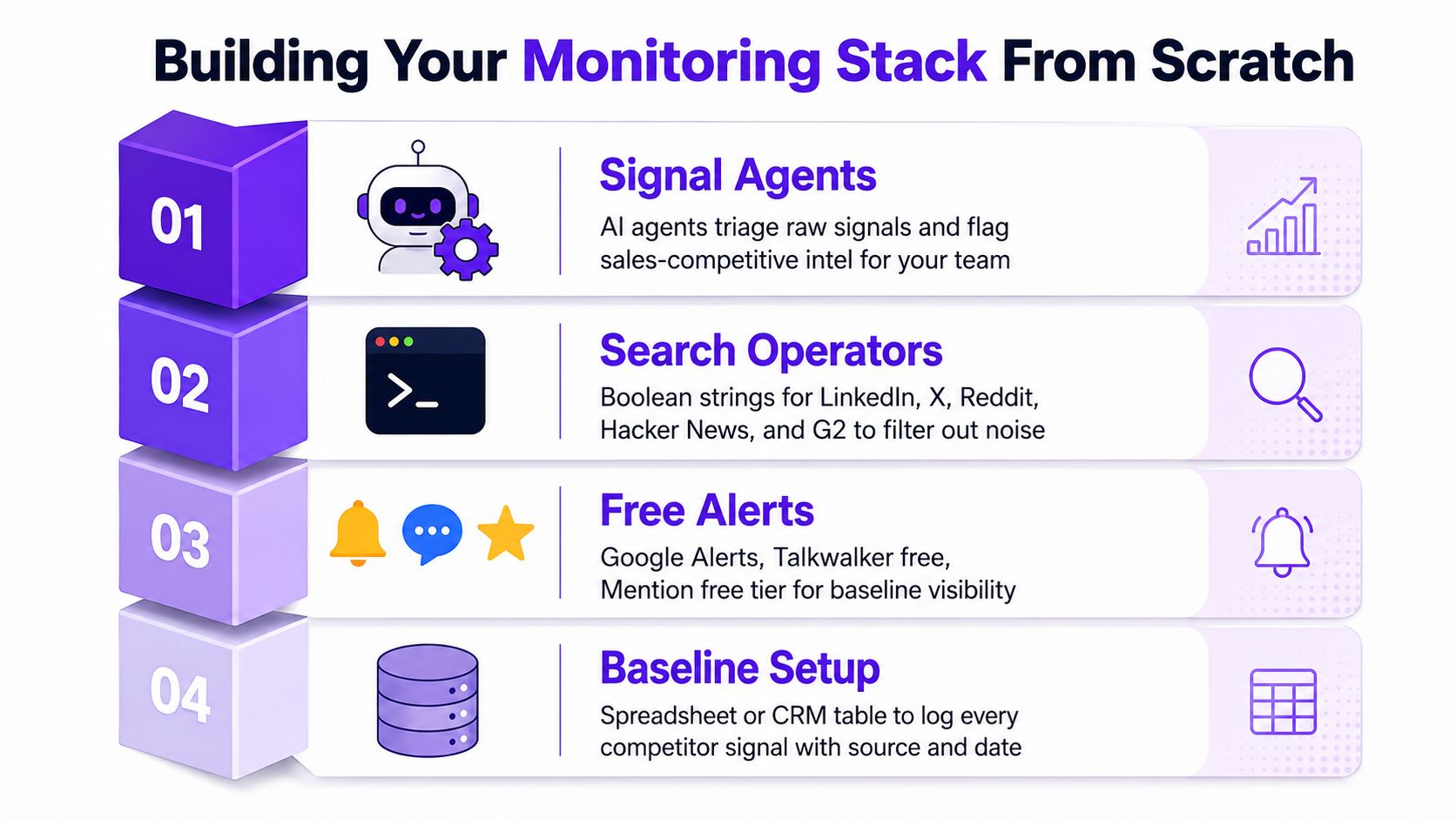
Layer one, free alerts
Create one Google Alert per competitor brand and another per CEO name. Add competitor domains to Feedly boards so product pages, blogs, and newsroom updates arrive in one place. Talkwalker's free offering and Mention's free tier can provide additional baseline visibility.
Useful queries include:
site:linkedin.com/posts "competitor" ("hiring" OR "launching")inurl:changelogintitle:pricing filetype:pdf
For Reddit, use subreddit-specific Boolean blocks such as:
site:reddit.com/r/[relevant-subreddit] ("competitor name" OR "alternative to" OR "pricing")site:reddit.com/r/[relevant-subreddit] ("competitor complaint" OR "switching from")
These queries aren't magic. They're filters. Adjust the terms after reviewing what gets through.
Layer two, search operators
Search operators expose pages that ordinary alerts miss, especially PDFs, old changelogs, hiring pages, and niche conversations. Keep a small query library in Notion or Airtable, and document why each query exists. If no seller has used a query output recently, retire it.
Layer three, Signal Agents
Use Signal Agents to deduplicate feeds and route summaries into Slack channels. A useful prompt asks for:
A one-line summary.
The source URL.
The competitor and tier.
The suggested seller action.
The affected account or deal, if known.
RoverLead AI can be one option for teams that want Signal Agents to monitor public engagement around defined competitors, creators, and niche topics, then deliver ICP-matched context for prospecting. Keep its output in the same action loop as every other source, rather than creating a separate intelligence silo.
Layer four, a lightweight archive
A Notion database or Airtable table should timestamp every signal, store the source, record the reviewer, and show the assigned action. You don't need a beautiful dashboard. You need an audit trail and a way to see whether signals became useful work.
Free tools cost time. Paid tools cost money. Signal Agents cost neither in license terms, but they need prompt tuning, source checks, and human review. The right stack is the one your team will operate consistently.
For a broader evaluation of tool categories, see competitor monitoring tools.
Triage and Prioritization Without Drowning
Raw alerts become useful only after someone applies judgment. Run a 30-minute Monday triage ritual with three gates, then route each surviving signal to a person who can do something with it.
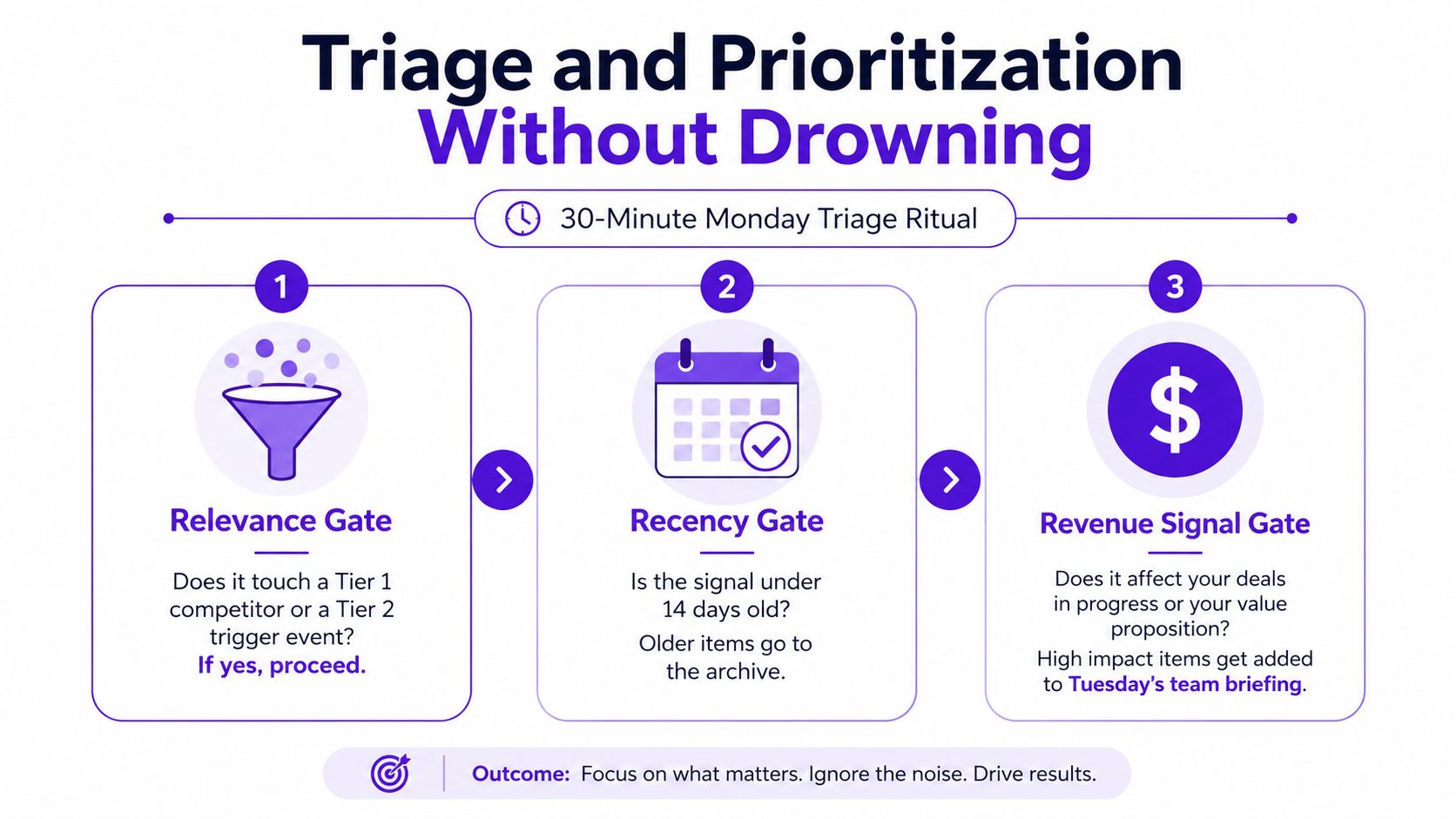
Gate one, relevance
Ask whether the signal touches a Tier 1 competitor or a meaningful Tier 2 trigger event. A competitor's generic blog post probably fails. A new enterprise package from a direct rival passes.
Gate two, recency
Ask whether the signal is under 14 days old. Older items go to the archive unless a live deal makes them relevant again. This prevents the team from presenting stale information as breaking intelligence.
Gate three, revenue signal
Ask whether the event affects pricing, positioning, hiring, or a deal in the pipeline. If the answer is no, the item belongs in a lower-priority digest or disappears entirely.
Score each surviving signal from 1 to 3 for impact and 1 to 3 for urgency. Items below 4 stay in the weekly digest, items from 4 to 6 receive a Slack push to the AE who owns the affected account, and items above 6 trigger a same-day battlecard update. This is an internal operating rubric, not a market statistic.
A signal without an owner is just trivia wearing a notification badge.
Route the work
Use four simple board columns in Notion or Trello:
Raw: Unreviewed source material.
Scored: Relevance, recency, impact, and urgency recorded.
Routed: Owner and deadline assigned.
Archived: Closed, rejected, or no longer useful.
The four-question filter should kill most noise before a human spends serious time on it: Is the source credible? Is the event recent? Does it affect a buyer or deal? Can a seller act on it this week?
The outputs should be tangible: a battlecard delta, a prospect hook, or a pricing objection response. Teams can connect account prioritization with predictive lead scoring, but scoring shouldn't become an excuse to avoid assigning an action. No signal enters the system without a named owner and a deadline.
Turning Signals Into Weekly Seller Action
Dashboards fail when they ask reps to remember another destination. If a seller has to log into a tool, interpret an alert, and translate it into language for a prospect, the intelligence will die in a browser tab.
Ship three artifacts every Friday by 10 a.m. Each one should be short enough to use during a live deal.
Artifact | Channel | Owner | Cadence |
|---|---|---|---|
Battlecard deltas |
| Competitive enablement or sales ops | Friday |
Prospect hooks |
| SDR or AE owner | Monday |
Pricing snippets | CRM playbook and deal notes | Sales ops with product marketing | As triggered |
A battlecard delta gets one paragraph per Tier 1 competitor: what changed, why it matters, and the counter-talk track. A prospect hook gives AEs three to five personalized openers they can paste into LinkedIn or email, grounded in the observed event. A pricing snippet provides two or three concise responses to the pricing move appearing most often in conversations.
The CRM should create a follow-up task when a prospect engages with a monitored competitor event, provided the activity can be handled lawfully and within the platform's rules. The task should include the signal, source, account, suggested opener, and due date. That turns monitoring into workflow instead of homework.
Start distribution at 40% battlecard deltas, 40% prospect hooks, and 20% pricing snippets, then adjust the mix quarterly using win-loss data. If sellers keep using hooks but ignore long battlecards, shorten the cards. If pricing objections dominate calls, shift more editorial capacity toward snippets. The feed serves the field, not the other way around.
Compliance, Ethics, and Platform Boundaries
A competitor alert can become a sales problem if its source, retention, or intended use is unclear. Build the monitoring program around lawful, public, permitted information. An accessible page is not automatically available for copying, storage, or automated processing.
LinkedIn sets especially specific limits. Member social activity data obtained through its Marketing APIs may be stored for no more than 48 hours, while most member profile data may be stored for only 24 hours, according to LinkedIn's Marketing API data rules. LinkedIn's Developer AI Policy also generally prohibits using page and member data obtained through Marketing APIs to train AI functionality or as an AI prompt or input, except where specifically allowed.
A LinkedIn workflow therefore needs a documented data path, not just an export button. Confirm the source, retention period, permitted use, vendor controls, and whether the planned processing fits the applicable terms. If a signal cannot be retained or used lawfully, it cannot support a seller task.
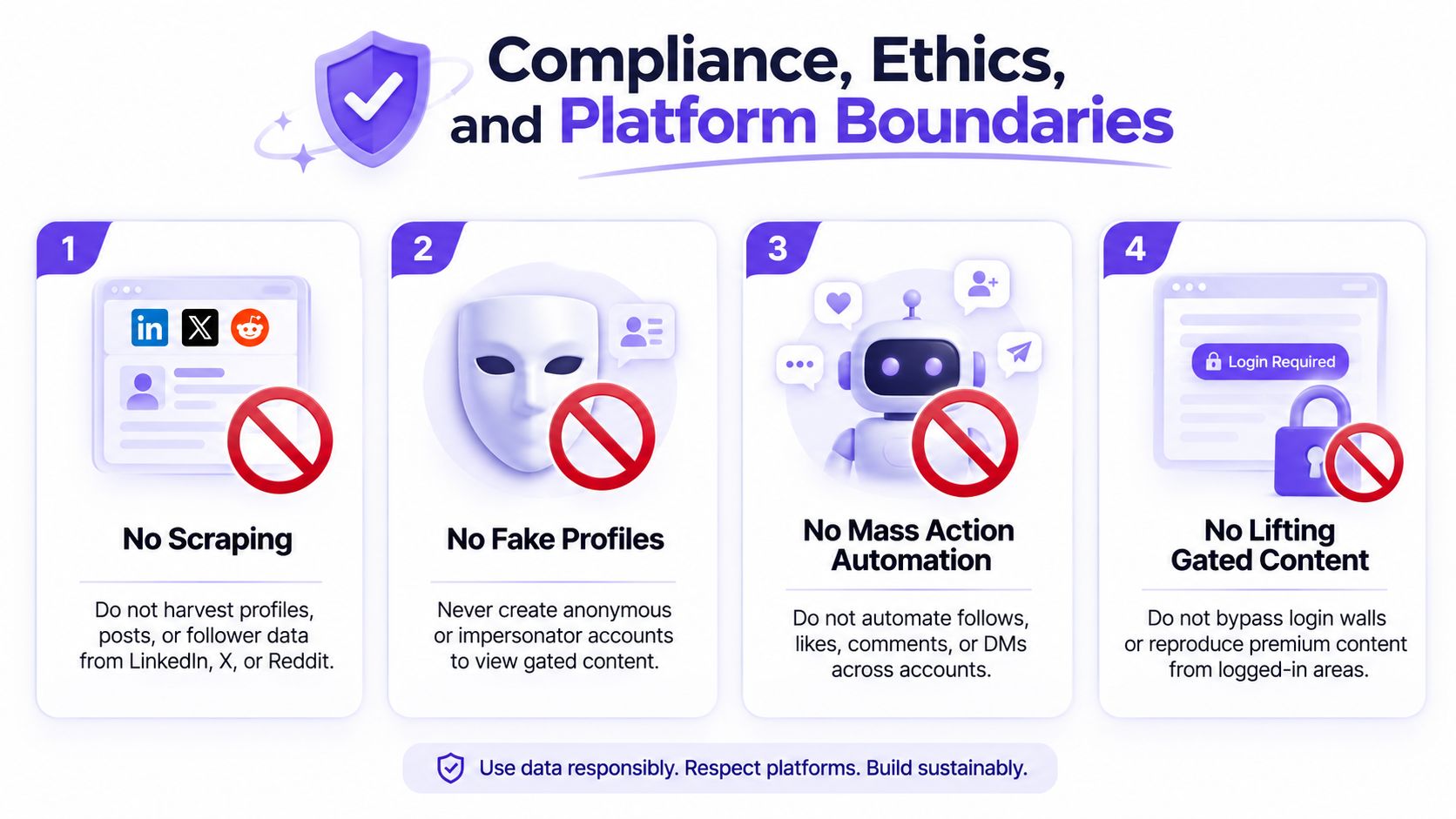
Rules for social platforms
Do not scrape LinkedIn, X, or Reddit. Do not create fake profiles, impersonator accounts, or anonymous identities to view gated content. Do not automate mass follows, likes, comments, or direct messages. Do not bypass login walls or reproduce premium content from logged-in areas.
Public content still requires judgment. A post may include personal information, confidential context, or an identifiable complaint that does not belong in a sales brief. Capture the competitive implication, not every personal detail.
Community ethics checklist
Attribute the source: Record where the observation came from, with the date and relevant context.
Anonymize complaints: Remove names and identifying details unless there is a legitimate reason to retain them.
Never impersonate: Do not enter a community under a false identity to gather intelligence.
Flag conflicts: Tell legal, security, or leadership when a source raises a conflict before publishing the insight.
Separate fact from inference: Label what the competitor said, what the buyer said, and what your team believes it means.
Review access monthly and data retention quarterly. Assign a named owner to every competitor file, including responsibility for deletion, source verification, and escalation. A vendor checklist should cover Terms of Service alignment, data residency, DPA status, retention controls, access logging, deletion procedures, and whether AI processing is allowed for the exact data involved.
A 30-60-90 rollout
Days 1–30: Choose the three-tier competitor stack, set up alerts and RSS, assign one owner, and ship one Slack channel.
Days 31–60: Run the weekly triage ritual, publish the first battlecard delta, and pipe three signals into live deals. Each signal should end with a seller action, such as an account review, talk track update, or follow-up task.
Days 61–90: Track competitor-mention rate in won deals, time-to-update on battlecards, and pipeline influenced by alerts. Cut any feed that stays below your defined threshold or produces no usable seller action within seven days.
Keep the Friday 15-minute review focused. The owner names one signal that shaped a deal that week, and the team records the resulting action. If nobody can name one, reduce the feeds and improve routing before adding more sources.
RoverLead AI helps sales teams monitor public engagement around competitors, creators, and niche topics, then turn relevant activity into ICP-matched leads with context and an AI-written opener. Define competitors and buying signals, connect the resulting intelligence to the seller workflow, and visit RoverLead AI to see how the platform can support timely, compliant prospecting.