
Sales Time Management That Actually Books Meetings

The popular advice on sales time management is backwards. Many sales organizations tell reps to “save time,” then refill the reclaimed hours with forecast calls, CRM fields, internal updates, and another dashboard nobody checks. Saving time is the easy part. Protecting and reinvesting it is the operating problem.
Salesforce data summarized in a 2024 sales time management benchmark found that sales professionals spend only 29% of their workweek on selling activities, or about 11.6 hours in a standard 40-hour week. The other 71% goes to administration, data entry, and preparation. That gap isn't a personal discipline failure. It's a calendar design failure.
A useful system answers two blunt questions. Which activities are stealing the week, and where does every reclaimed hour go before a manager fills it again? Treat time as a budget to allocate, not a pile of minutes to shave.
Table of Contents
The Uncomfortable Truth About Sales Time Management
Sales reps don't need a longer day. They need fewer invisible taxes on the day they already have.
Historical benchmarks show the problem has been persistent. Earlier research reported only 35.2% of sales time devoted to revenue-generating activities, with 64.8% spent on non-revenue work, according to this sales time management benchmark. Forbes also summarized research showing that only 28% of sales reps followed a structured time-management methodology, while 63% of their time went to non-revenue-generating activities in 2018 (Forbes).
The implication is uncomfortable. A rep can be busy all day and still produce very little buyer-facing momentum. A full calendar filled with CRM maintenance and internal coordination is not evidence of productivity. It's often evidence that the operating model has confused motion with progress.
Operating rule: Every hour removed from administration needs a named destination before automation goes live.
That destination should usually be one of four things: high-intent prospecting, live buyer conversations, deal advancement, or useful coaching. If the hour becomes space for more reporting, the team has improved efficiency without improving sales capacity.
The mistake is treating time management as an individual skill. Managers control recurring meetings, CRM requirements, approval workflows, and reporting expectations. Reps control prioritization, preparation, and follow-up discipline. Both sides must redesign the week, or the same old work will return wearing a new software badge.
Where the Week Actually Goes
A sales week rarely collapses under one oversized task. It gets consumed by small obligations: CRM updates, internal meetings, email, scheduling, and research. A 2026 benchmark divides a 40-hour week across those activities and active selling in this sales productivity breakdown.
How a 40-Hour Sales Week Breaks Down
Activity | % of Week | Hours/Week | Quota Impact |
|---|---|---|---|
Active selling | 28% | 11.2 | Direct buyer interaction and pipeline creation |
CRM data entry | 17% | 6.8 | Necessary recordkeeping, but limited direct selling value |
Internal meetings | 15% | 6.0 | Coordination, updates, approvals, and reviews |
Email and admin | 14% | 5.6 | Follow-up administration and routine communication |
Scheduling | 12% | 4.8 | Calendar coordination and logistics |
Research | 14% | 5.6 | Account preparation and prospect intelligence |
The table accounts for the full workweek. A rep has just over 11 hours of active selling, while the remaining time goes to recordkeeping, coordination, communication, logistics, and preparation. A Salesforce-based summary places data handling and preparation at 54% of the week, or more than 21 hours. That gap explains why pipeline work feels squeezed even on a busy, disciplined team.
Treat these hours as capacity, not an automatic financial loss. Quota impact depends on territory, deal size, sales cycle, conversion quality, and role. The operating conclusion is clear: each hour lost outside live selling reduces capacity for pipeline creation and deal progression. Recovering time matters only when the team assigns it to buyer conversations, high-intent outreach, deal advancement, or coaching.
Run a three-day audit before buying another tool. Log every task in 30-minute blocks, then tag it as selling, CRM, meetings, email and admin, scheduling, or research. Add a second label: did the task create buyer momentum, protect data quality, or satisfy an internal habit? The final category identifies meeting series, duplicate reporting, and manual updates that managers can remove or redesign. Protect the recovered hours on the calendar before automation begins, or they will be swallowed by new meetings and reporting.
Choosing the Right Prioritization Framework
No prioritization framework fixes a calendar that leadership keeps overloading. Still, the right combination gives reps a reliable way to decide what deserves attention when everything arrives marked urgent.
Framework | Best Used For | Sales Day Fit | Trade-off |
|---|---|---|---|
Eisenhower matrix | Sorting urgent and important work | Triage a flooded inbox and separate buyer issues from internal noise | Can become subjective when every task feels important |
Pareto rule | Focusing accounts and activities | Choose the small group of accounts that deserves the main call block | Requires credible account scoring and regular review |
Time blocking | Protecting attention | Safeguard a prospecting window from meeting creep | Needs manager support and calendar discipline |
ABCDE method | Ranking daily tasks | Give individual reps a ruthless order of execution | Can over-focus on today and neglect longer-term account strategy |
Eisenhower is the emergency-room tool. Use it when the inbox is full, a deal is wobbling, and three colleagues want immediate answers. Handle important and urgent buyer work first, schedule important but non-urgent work, delegate what someone else can complete, and remove low-value distractions.
Pareto is the account-allocation tool. It helps a rep decide which accounts deserve concentrated effort, especially when a flat territory list encourages equal attention to unequal opportunities. Pair it with disciplined lead scoring best practices, not instinct alone.
Time blocking is the defensive tool. Put prospecting, calls, follow-up, and CRM cleanup on the calendar as real appointments. A block without a defined deliverable is only a colored rectangle.
ABCDE is the daily blade. Label tasks by consequence, then complete the highest-value work before low-impact requests consume the morning.
Choose one strategic framework, either Pareto or time blocking, and one tactical framework, either Eisenhower or ABCDE. Don't make reps run four systems at once.
A Daily and Weekly Routine That Protects Selling Time
A calendar should defend the rep from predictable distractions. It shouldn't require a manager to patrol every hour.
The daily template
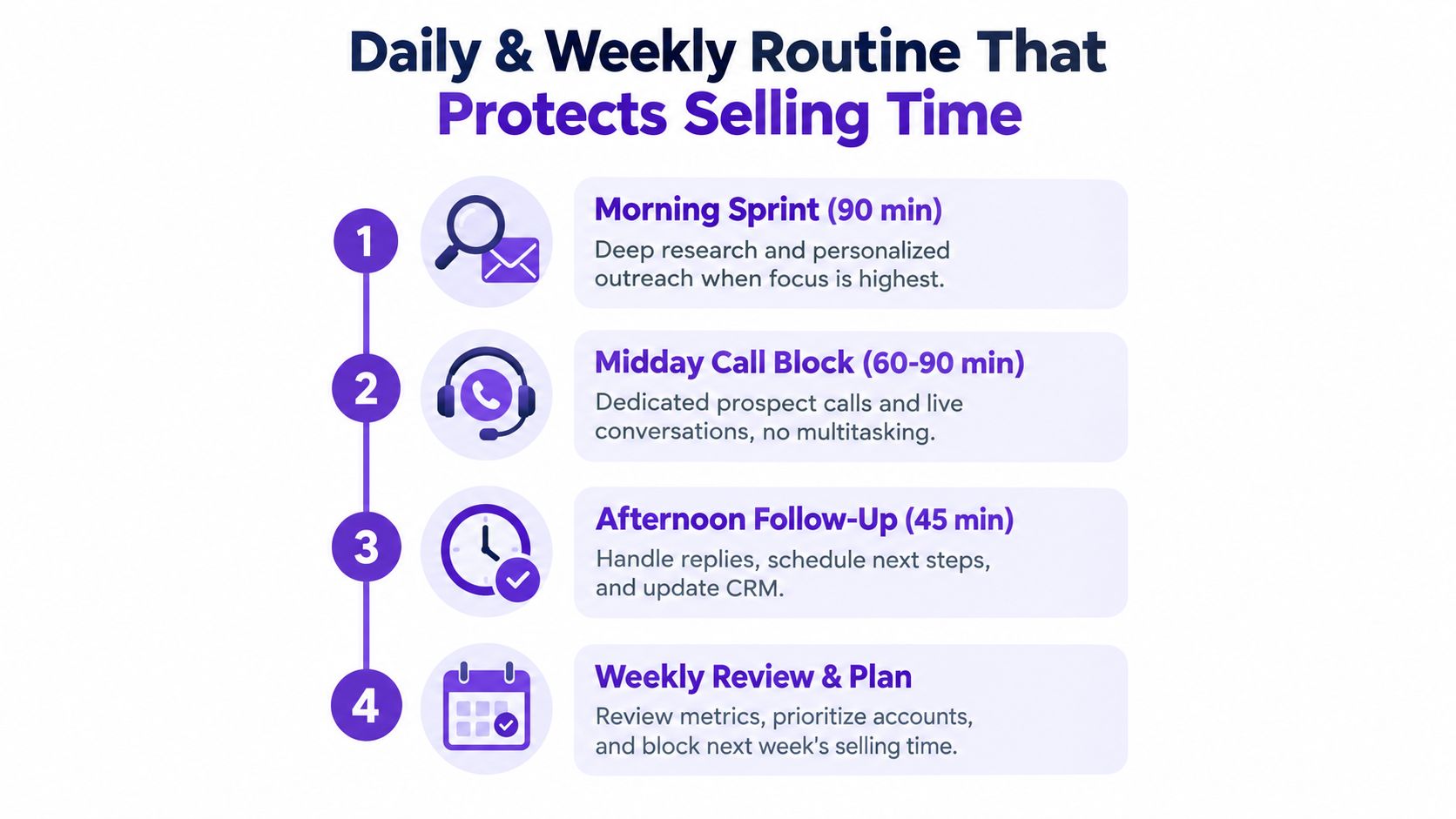
Start with a 90-minute morning research and outreach sprint. The deliverable is a short, prioritized queue of accounts, personalized messages, and connection requests. Research should support action, not become an elaborate biography of every prospect.
Follow it with a 60-to-90-minute midday call block. The deliverable is completed calls, live conversations, and scheduled next steps. No internal meetings, CRM cleanup, or multitasking belongs inside this block.
Reserve a 45-minute afternoon follow-up window. The output is a cleared reply queue, scheduled meetings, next-step messages, and qualification updates. Finish with 15 minutes of CRM cleanup, enough to record outcomes while the context is still fresh.
The weekly guardrails
Monday is for pipeline triage. Remove dead opportunities, rank active accounts, and publish the week's target list. Wednesday gets a mid-week deal review focused on blocked next steps, not a tour through every CRM field. Friday is for forecast, results, and a short retro that produces one process change for the following week.
Delegation needs the same precision. An SDR can hand enrichment and list formatting to a VA, while an AE can bring in a solutions engineer for technical discovery instead of attempting to answer every product question alone. The handoff must include ownership, context, and a specific next action.
Automation should trigger work, not create more monitoring. A prospect opening an email repeatedly can create a review task. A champion changing jobs can trigger account research and a thoughtful re-engagement prompt. The rep still decides whether the signal is relevant and whether the message sounds human.
Use a shared sales productivity app stack only when each tool has one clear job. More tabs don't equal more efficiency.
Cutting Research Time With RoverLead AI
On Tuesday morning, an SDR starts with a defined ICP instead of a blank LinkedIn search. The criteria include target roles, company characteristics, relevant keywords, competitors, and experts worth monitoring. A signal feed then surfaces job changes, funding activity, hiring posts, content interactions, and other signs that an account may be entering a buying conversation.
The SDR reviews the accounts first. That order matters. Good sales time management doesn't replace judgment with automation. It gives judgment a smaller, more relevant queue.

In this workflow, RoverLead AI scores high-intent LinkedIn prospects and drafts personalized outreach for approval. The rep reviews 15 short note prompts in under 10 minutes, approves the queue, and lets connection requests and follow-ups run on the chosen cadence. A manual research-and-outreach morning that takes about three hours becomes roughly 45 minutes of review, based on the workflow scenario described here, not a guaranteed performance result.
The human work stays important. The SDR edits tone, decides when a referral ask is appropriate, checks whether the signal relates to the offer, and handles replies. AI can draft a relevant opener. It can't take responsibility for a careless claim or a bad-fit conversation.
For teams evaluating prospect research tools, the buying question should be operational: does the workflow return the rep to live conversations, or does it add another queue to inspect? Approval gates matter because nothing should send until the rep accepts the message and targeting.
The right loop is find, review, approve, converse. Not scrape, blast, apologize.
Measuring Whether the Time Is Actually Protected
Protected selling time requires measurement. Track calendar hours first, then connect them to pipeline outcomes and follow-up discipline.
KPI | Healthy Range | Action Trigger | Cadence |
|---|---|---|---|
Selling hours per rep per week | Protected buyer-facing blocks | Below 18 hours | Weekly |
Meetings booked per held day | Stable or improving against the team baseline | Decline while selling hours remain protected | Weekly |
Time-to-first-touch on inbound | Fast enough to preserve buyer intent | Slower than the team's agreed service standard | Daily |
CRM hygiene rate | At least 85% complete for required fields | Below 85% | Weekly |
Follow-up cycle | Consistent with the agreed cadence | Longer than five days | Weekly |
Use these as starting operating triggers and calibrate them against your own baseline, role, territory, and sales motion. The 18-hour selling-time trigger and 85% CRM completeness trigger create a practical internal reference point. The five-day follow-up trigger highlights a queue that may be losing momentum. None is a universal benchmark.
Run a Monday 15-minute review. Compare the previous week's calendar with the activity record, identify displaced selling blocks, and assign a fix. Once a month, audit recurring meetings, reporting requests, and required CRM fields. Flag reps whose customer-facing windows are being consumed by internal coordination.
Review whether recovered hours produced calls, qualified conversations, or deal progress. A sales activity tracking system should make that connection visible, not create another reporting queue. If reclaimed time never becomes customer-facing work, the team has only rearranged tasks.
Your Monday Morning Playbook and FAQ
Sales benchmarks place active selling at roughly 28% to 30% of the workweek, according to the Salesforce benchmark summary. The answer isn't to demand frantic activity. Reclaimed hours need a destination, and that destination must favor high-intent conversations, deal advancement, and coaching over more internal reporting.
Run this playbook on Monday
Block Tuesday through Thursday selling windows. Create the calendar blocks and attach a deliverable, such as a qualified account queue, completed call block, or scheduled next step.
Audit Friday's CRM hygiene. Remove stale opportunities, complete required fields, and queue the accounts that deserve attention next week.
Stand up one RoverLead AI signal. Choose a signal relevant to the ICP, then review fit every week instead of allowing the feed to become background noise.
Delegate meeting notes and data entry. Assign ownership to an ops pod, VA, or approved automation workflow, with a clear completion standard.
Cap internal meetings at four hours. Publish the cap, remove status meetings that dashboards can replace, and keep live meetings for decisions and coaching.
Frequently asked questions
How do I defend selling blocks against a demanding manager?
Show the calendar and the output. Ask which meeting should replace the block, then record the trade-off in terms of calls, conversations, follow-ups, or deal progression. A protected block is easier to defend when it has a measurable deliverable and the manager can see what displaced it.
What should we change when pipeline slips despite protected time?
Check account quality before adding activity. Review ICP fit, buying signals, qualification, message relevance, and follow-up completion. More hours aimed at weak accounts won't repair a prioritization problem.
Does AI-sourced outreach reduce reply quality?
It can if the team sends generic drafts without review. Use AI for signal detection, research compression, and first-draft personalization, but keep approval, tone edits, qualification, and reply handling with the rep.
Time saved without a destination is just slack. Time saved and deliberately reinvested becomes selling capacity.
RoverLead AI helps B2B teams surface high-intent LinkedIn activity, review personalized outreach, and automate approved follow-ups without spray-and-pray messaging. Visit RoverLead AI to turn reclaimed research time into a controlled pipeline-building routine.