
Prospecting on LinkedIn: A Playbook for Real Pipeline

Your LinkedIn prospecting probably looks busy. Your CRM still looks hungry.
That's the trap. Reps send invites, collect a few accepts, maybe get a polite reply, then book nothing and assume they need more volume, sharper copy, or another sequencing tool. Usually they need none of those first.
LinkedIn matters because buyers are already there. Recent summaries say around 80% of B2B social media leads come from LinkedIn according to Traxy's 2026 LinkedIn social selling roundup, and LinkedIn's own marketing materials say the platform has more than 130 million decision-makers and about 1.2 billion members globally in a business-heavy environment that influences buying behavior according to LinkedIn's statistics for B2B decision-makers. So yes, prospecting on LinkedIn is worth doing.
But doing it badly at scale just helps you fail faster.
Table of Contents
The Pipeline Problem Most LinkedIn Playbooks Miss
You know the sequence. A rep sends a pile of connection requests, gets a handful accepted, sends the usual “thanks for connecting” note, and hears crickets. Then leadership asks for more activity. Nobody asks whether the list was wrong from the start.
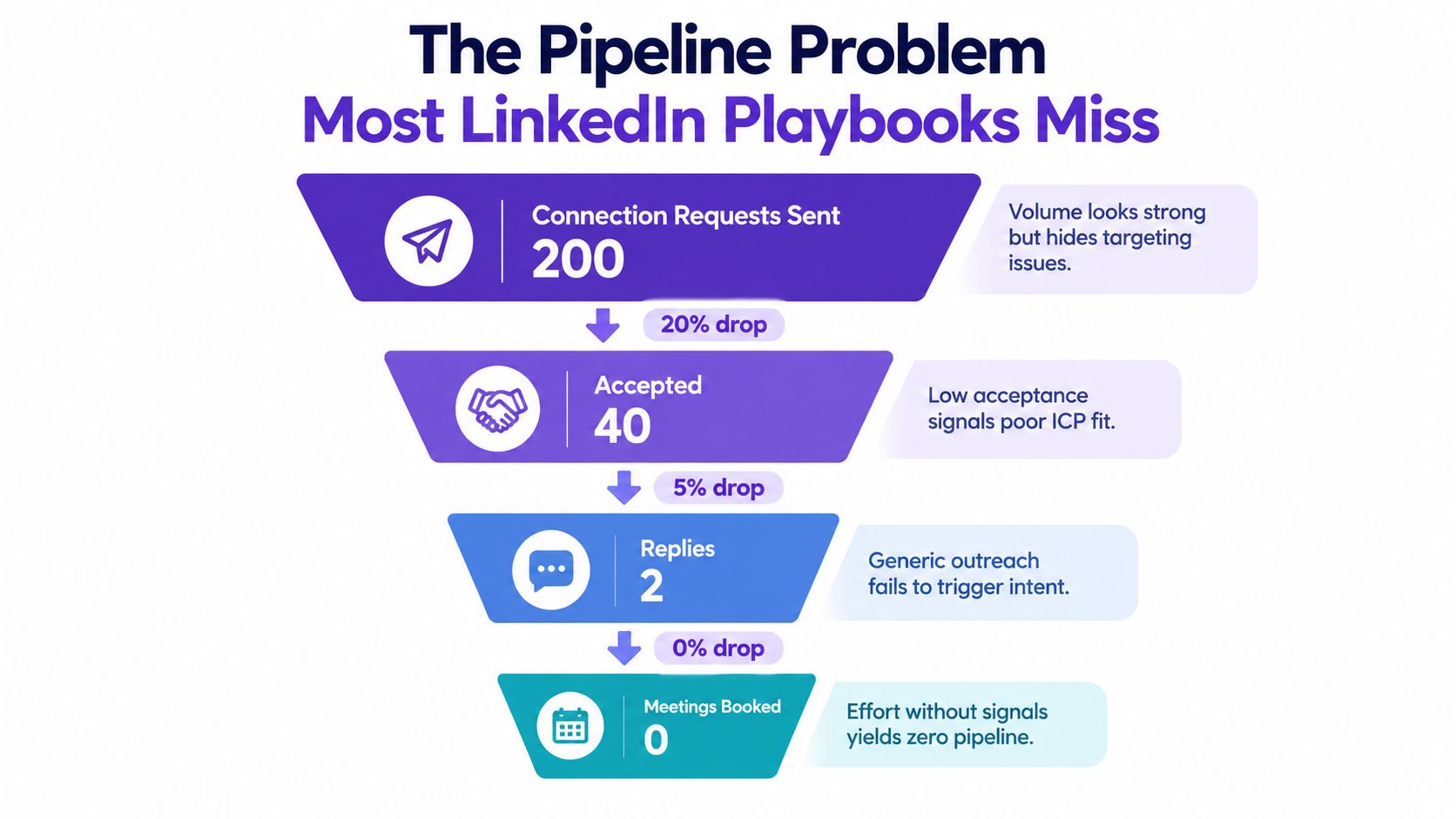
The ugly truth is that LinkedIn outbound doesn't usually fail at the first touch. It fails in the dead space between acceptance and meaningful conversation. A benchmark study covering 180,155 connection requests found 27.1% acceptance, 27.6% reply rate among accepted connections, and only 2.0% booked meetings among accepted connections according to Reachium's 2026 LinkedIn outreach benchmarks. That's the part most playbooks politely step over.
Why the middle of the funnel breaks
Three things usually cause the damage.
The ICP is too loose: Reps target anyone who looks adjacent to the market instead of people who can buy.
Signals get ignored: A prospect who just changed jobs, commented on a relevant post, or started hiring is treated the same as a random stranger.
The opener says nothing real: Copy-paste flattery and fake personalization die on contact.
Practical rule: If your message would still “work” with the prospect's name swapped out, it's probably junk.
Prospecting on LinkedIn still gets managed like a quota game. Send more. Test more scripts. Add more automation. That's backward. You need a tighter funnel, not a louder one.
A good B2B lead generation funnel has friction in the right places. It filters early, prioritizes likely buyers, and asks reps to spend effort where intent already exists.
What to change
Stop measuring effort by invites sent. Start measuring whether the right people are seeing a relevant message at the right moment.
That means:
build a narrow ICP card,
source leads from signals, not giant lists,
treat the follow-up after acceptance as the conversion sequence.
That's where meetings come from. Not from heroic message volume.
Defining Your ICP in Five Minutes, Not Five Workshops
Most ICP work turns into theater. Too many slides, too many opinions, not enough usable filters.
An SDR does not need a two-hour debate about “strategic fit.” An SDR needs a one-page card they can use before breakfast.

The six inputs that matter
Pull these before your first Sales Navigator search.
Company size range: Pick the employee band your team can sell into.
Revenue band: Use whatever internal customer data tells you there's real budget fit.
Funding stage: Early startup, growth stage, mature enterprise. These buy differently.
Tech stack indicators: Tools named in job posts, onboarding roles, RevOps hires, CRM mentions.
Decision-maker titles: Not twenty titles. Three that usually own the problem.
Industry focus: Two verticals where your team already has proof, language, and examples.
If you want a clean starting point, this guide on how to define your ICP is worth keeping open while you build the card.
What the ICP card should look like
Keep it ugly and useful. One page. No branding exercise.
Include:
target employee range
target industries
buying titles
supporting influencers
disqualifying company stages
excluded geographies
known tech-stack clues
common trigger events
That's enough to shape every LinkedIn search, saved lead list, and outreach sequence.
A vague ICP makes reps feel productive while they burn hours on people who will never buy.
Disqualify faster
They'd rather keep a bloated list than admit half of it is dead weight.
Cut leads if:
Seniority is too low: If the role can't influence or own the problem, move on.
Lifecycle is off: Some companies are too early to care. Others are too entrenched to switch.
Coverage is impossible: If your team can't sell into the geography or segment, stop pretending.
The point of prospecting on LinkedIn isn't to find “possible” prospects. It's to find the shortest path to a sales conversation.
Revisit every 30 days
Your ICP card should get sharper, not older. Review closed-won and closed-lost notes monthly. Check what titles progressed, what industries stalled, and what company patterns showed up repeatedly.
If your card hasn't changed in three months, one of two things is true. Either your market is frozen, or your team isn't learning.
Targeting Quality vs Creative Quality
Sales teams love to obsess over copy because it feels controllable. Rewrite the first line, test a question, swap plain text for video, call it optimization. Fine. But if the audience is weak, your “test” is just a prettier failure.
An independent benchmark across 389,890 prospects and 15 tests found broad role-based targeting produced 13.0% replies and a 1.4% meeting rate, while verified ICP plus subject-matter matching reached 51.9% replies and a 6.5% meeting rate according to Prospectio's LinkedIn reply rate benchmarks. Same channel. Very different discipline.
Targeting Quality vs Creative Quality Same Effort, Different Pipeline
Dimension | Scenario A: Clever Copy, Weak Targeting | Scenario B: Tight ICP, Signal-Led Targeting |
|---|---|---|
Audience selection | Broad roles, light filters | Verified ICP, contextual match |
First-touch style | Polished messaging | Relevant messaging tied to buyer context |
Likely outcome | Replies from curiosity, little pipeline | Replies from fit, better meeting odds |
Reply benchmark | 13.0% | 51.9% |
Meeting benchmark | 1.4% | 6.5% |
Main problem | Testing copy on the wrong list | Requires list discipline and patience |
The same benchmark also found personalized video beat text-only first touch with 40.4% vs 28.8% reply rate and 6.4% vs 4.1% meeting rate in that dataset. Useful, yes. But don't miss the bigger point. The gap created by audience fit was larger than the gap created by message format.
What this means in practice
If your team has to choose where to spend time this quarter, spend it on:
tighter search filters,
better disqualification,
signal-led prioritization.
Spend less time pretending A/B tests will rescue a sloppy list.
Copy amplifies targeting. It doesn't replace it.
Reading Buying Signals on LinkedIn Before You Reach Out
This is the part most reps skip because it takes thinking. They'd rather export a list and start pitching. That's exactly why inboxes fill up with ignored messages.
Prospecting on LinkedIn works better when you chase signals, not static profiles.
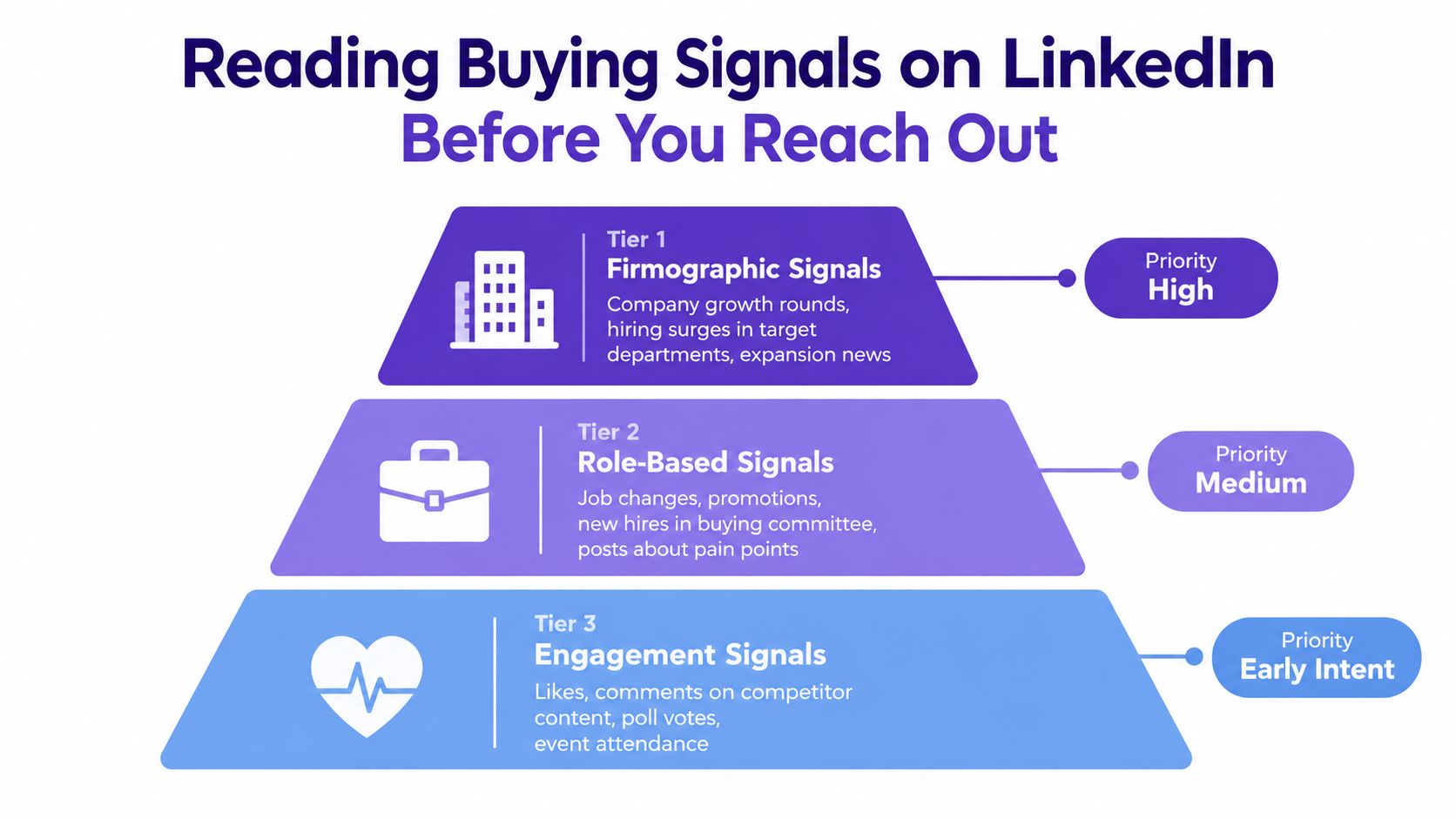
The three signal tiers
Start with this simple hierarchy.
Firmographic signals: funding news, hiring surges, expansion, leadership changes, job posts that reveal stack or process changes.
Role-based signals: promotions, new hires into the buying committee, people entering a “prove yourself” window in a new role.
Engagement signals: comments, reactions, competitor content engagement, posts about pain points, event participation.
A useful summary from SyncGTM on LinkedIn B2B sales behavior makes the bigger strategic point: buyers often research vendors on social before they engage sales. That means visible activity matters before your message ever lands.
Here's a quick walkthrough on spotting stronger intent before outreach:
How to surface those signals
Use plain tools first.
Boolean search on LinkedIn: Search for relevant phrases in posts and comments around your niche problem.
Sales Navigator alerts: Watch for job changes, saved account updates, and leadership moves.
Google Alerts plus profile checks: Crude, but still useful for funding, hiring, or expansion mentions.
Specialized tools: Shield can help with content tracking. Trigify can help surface engagement patterns. RoverLead AI is another option that monitors LinkedIn activity such as comments, content interactions, competitor engagement, and buyer keywords, then drafts context-aware outreach for approval.
If you need a cleaner framework for interpreting them, this write-up on buying signals in sales is a practical reference.
Prioritize like an adult
Not every signal deserves a message today.
Use this rule:
Tier 1 signal plus ICP fit: reach out now
Tier 2 signal: warm the relationship first through profile view or engagement
Tier 3 signal only: nurture or skip unless other context appears
The prospect who commented intelligently on a niche pain point yesterday is warmer than the one who merely matches your title filter.
A separate industry report notes that typical acceptance rates sit around the 30% to 40% range and users often send only about 51 connection requests per week, based on PhantomBuster's 2026 LinkedIn prospecting industry report. That tells you something important. The bottleneck usually isn't capacity. It's relevance.
Outreach Sequences and AI-Assisted Openers That Earn Replies
Once you've got fit and signals, the sequence gets simpler. Not easier. Simpler.
Most reps still ruin decent targeting with needy first messages, obvious templates, or a pitch before the buyer has any reason to care. Stop that.
A better outreach flow respects two facts. First, your connection note is constrained. LinkedIn notes are capped at 300 characters, according to Taplio's explanation of LinkedIn connection request limits. Second, benchmark data shows connection-request notes are weak reply drivers. In the Reachium study cited earlier, connection-request notes produced 3.0% replies, while outbound messages produced 10.4% replies among that benchmark set. So use the note to earn acceptance, not to force the whole sale.
Cold vs Warm Outreach Sequence Compared
Touch | Cold Sequence (Signal-Led) | Warm Sequence (Engagement-Led) |
|---|---|---|
Connection request | Mention one specific trigger in under 300 characters | Connect after a profile view, like, or comment tied to their post |
First message | Context + tension + question | Reference prior interaction, then ask a light question |
Day 3 follow-up | Add value such as a relevant observation or resource summary, no link dump | Continue the thread from their content or recent company move |
Day 7 follow-up | Short breakup note, easy out | Soft nudge tied to the earlier engagement |
Reconnect later | Re-enter after a new trigger event | Re-enter when they post, hire, or switch roles |
Two message frameworks that work
Cold sequence from one strong signal
Connection request
“Noticed your team is hiring RevOps after the recent expansion. Usually that means process cleanup is coming fast. Thought it made sense to connect.”
First message after acceptance
Context: “Saw the RevOps hiring push.”
Tension: “Teams usually hit a handoff mess when pipeline grows before process does.”
Question: “Is that already on your radar, or is the hiring more about reporting?”
Warm sequence after engagement
Step one is simple. View the profile, like a relevant post if it's relevant, or leave a useful comment. Then send the invite.
Connection request
“Your point on demo no-shows was sharper than most takes I see here. I work with teams fixing that exact handoff mess. Thought I'd add you.”
First message after acceptance
“Appreciated your post on demo quality. Curious whether the bigger issue for your team is qualification before booking or follow-up after.”
Use AI for drafts, not autopilot judgment
AI is useful for openers when you feed it real context:
recent post text
headline
one-line signal
desired tone
hard limit on length
Prompt it to produce three opener options. Then edit like a human. Cut fluff. Remove flattery. Make sure the message sounds like something you'd send.
Use conversation starters that don't sound robotic as your benchmark. If the opener feels clever but not specific, rewrite it.
“Write with evidence from their world, not admiration for their profile.”
The do-not-send checklist
No flattery openers: “Loved your inspiring journey” belongs in the trash.
No obvious templates: Buyers can smell a variable field from a mile away.
No pitch in message one: Start a conversation, don't force a demo ask.
No links before a reply: Earn attention first.
No fourth chase message to silence: Pause and wait for a new trigger.
Compliance, Pacing, and Protecting Your Account
More activity is not automatically better activity. It's often just a faster route to account friction and worse lead quality.
LinkedIn connection requests are widely reported to run on a rolling 7-day cap of about 100 invitations for standard accounts, with safer pacing around 15 to 25 requests per day, and some warmed or higher-SSI accounts may reach 150 to 200 weekly, according to Connection Tracker's guide to LinkedIn connection limits. Treat that as a ceiling, not a dare.
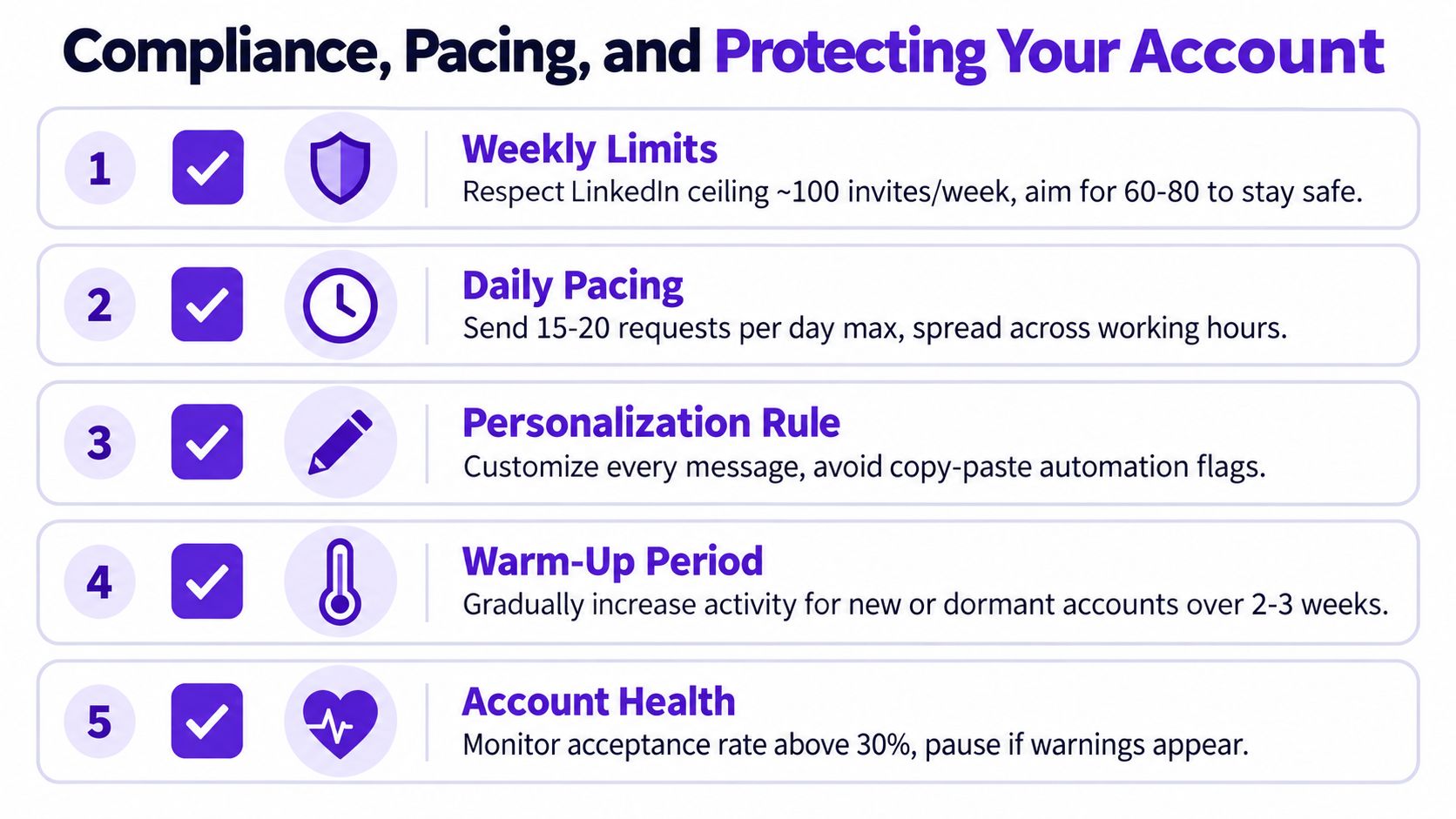
What safe pacing actually looks like
For established accounts:
Spread activity across the week: Don't dump everything into one afternoon.
Go slower with senior buyers: Executives respond better to lower-frequency, higher-context outreach.
Pause on warning signs: Falling acceptance, profile prompts, or more “I don't know this person” signals mean slow down.
LinkedIn also hard-caps first-degree connections at 30,000, after which you can only be followed, not add more connections, based on the Taplio guidance cited earlier. That matters for high-volume users who think the network is infinite. It isn't.
Compliance still matters off-platform
If you export data, enrich leads, or route traffic to an external landing page, your legal team should care about lawful basis, notice, and opt-out handling under the rules that apply in your region. A lot of scrapers and add-ons make this look casual. It isn't.
The practical rule is boring but useful:
know where your prospect data came from,
know why you're processing it,
make sure any external follow-up path gives the buyer a clear exit.
Red flags you shouldn't ignore
If acceptance drops sharply, don't write better copy first. Inspect targeting and pacing first.
Watch for:
unusual account prompts
acceptance rates sliding for no obvious reason
more negative responses about relevance
sudden restrictions on actions
Protect the channel. Prospecting on LinkedIn is too valuable to burn for the sake of a weekly vanity report.
Metrics That Matter and Your 90-Day Prospecting Rollout
Many teams track the wrong scoreboard. They celebrate connection volume, profile views, and accepted invites, then act surprised when meetings stay flat.
A benchmark summary also says 78% of salespeople who social-sell outperform peers who do not, according to Martal's LinkedIn statistics roundup. Fine. But “social selling” only matters if you instrument the behavior that leads to booked conversations.
Metrics That Predict Meetings vs Vanity Metrics
Metric | What It Tells You | Healthy Benchmark |
|---|---|---|
Connection-to-conversation rate | Whether accepted prospects actually engage | Use your own baseline and improve monthly |
Positive reply rate | Whether your opener and targeting create interest | Compare by signal source, not by rep opinion |
Signal-to-source attribution | Which signals create conversations worth pursuing | Healthy when a few repeatable signal types emerge |
Meetings held per 100 targeted accounts | Whether the whole workflow creates pipeline | Best top-line operating metric |
Connection volume | Mostly effort, not quality | Vanity metric |
InMail acceptance | Surface engagement, not pipeline quality | Vanity metric unless paired with meetings |
What to track every week
Use a CRM or even a clean spreadsheet if your CRM is a mess. Track:
source of prospect
signal observed
date of signal
title and company fit
accepted connection
replied
positive reply
meeting booked
meeting held
That gives you an actual operating view. Two weeks later, you'll know which triggers deserve more attention and which searches are wasting rep time.
Your 90-day rollout
Weeks 1 and 2
Tighten the ICP card. Build saved searches. Define disqualifiers. Create a short list of signals worth monitoring.
Weeks 3 to 6
Launch two or three outreach paths based on different signals. Test opener angles, not random stylistic tweaks. Review positive replies manually.
Weeks 7 to 12
Scale only the segments producing held meetings. Audit pacing. Clean up compliance habits. Add attribution so marketing, outbound, and leadership stop arguing from anecdotes.
LinkedIn has become a serious B2B demand environment. One summary says 40% of B2B marketers rank LinkedIn as the most effective channel for high-quality leads, 53% of B2B professionals consider it the most important social platform, and one benchmark summary cites 13% average conversion for LinkedIn Lead Gen Forms versus 4.02% for landing pages, according to Business Dasher's 2026 LinkedIn B2B statistics summary. The lesson for outbound is simple. Buyers are there. Your job is to show up with timing and relevance, not noise.
FAQ
Is prospecting on LinkedIn still worth it?
Yes. It's one of the few channels where professional identity, company context, and visible buying signals all sit in one place.
What's the biggest mistake reps make?
They mistake activity for progress. Too much list volume, not enough signal quality.
Should I use Sales Navigator or regular LinkedIn?
If LinkedIn is a serious pipeline channel for you, Sales Navigator usually earns its keep because filtering and alerts matter. If you're early, you can still start with manual searches and profile review.
Are connection request notes important?
They matter, but less than people think. Use them to earn acceptance, not to squeeze in a mini pitch.
How many messages should I send after someone accepts?
A short sequence works better than endless nudges. If there's no response after a few thoughtful touches, wait for a fresh signal.
What counts as a buying signal?
Job changes, hiring, funding, leadership shifts, comments on relevant topics, competitor engagement, and posts that reveal pain.
Should I pitch in the first message?
No. Ask a useful question tied to context. Earn the conversation first.
Is video worth using?
Sometimes, especially for high-value targets. But fix targeting before you obsess over format.
What if a prospect accepts but never replies?
That's common. Improve your post-acceptance follow-up, not just the invitation.
When should I abandon a sequence?
When relevance is gone. Stop chasing silence and wait for a new trigger.
RoverLead AI helps teams run this exact style of prospecting on LinkedIn by tracking real LinkedIn buying signals, surfacing high-intent ICP leads, and drafting outreach for approval instead of blasting strangers. If you want a workflow built around relevance, timing, and safer pacing, take a look at RoverLead AI.