
How to Find Decision Makers: Your 2026 Playbook

Most advice on how to find decision makers is stuck in a bad decade. It tells reps to hunt for the CEO, scrape a title list, and fire off a sequence like they're feeding a woodchipper with email addresses.
That approach fails because companies don't buy that way anymore. People do. Committees do. Timing does. The essential task isn't finding a fancy title. It's spotting the people who care about the problem right now, then figuring out who can approve, influence, and push the deal forward.
A stale list can give you names. It can't tell you who just got budget, who changed roles, who is leading the initiative, or who has started paying attention to the category. That's the difference between busywork and pipeline.
Table of Contents
Stop Hunting for Titles Start Mapping the Buying Committee
The old advice says, "Find the CEO." That's neat, simple, and wrong.
In B2B, the deal usually lives inside a decision-making unit, not inside one person's inbox. The decision-making unit model from D-eship breaks that group into End Users, Champions, and Primary Economic Buyers. It also notes that 70% of B2B deals stall because sales teams focus on Champions or End Users without securing approval from the Economic Buyer.
That should change how you prospect. Fast.
Know who is who
A rep who talks only to the most responsive contact usually ends up talking to the least dangerous person in the process. The friendly manager who books a call is often the Champion. Helpful, yes. Final approver, not always.
Use this simple lens:
End Users are the people who'll live with the tool.
Champions push internally and help you manage politics.
Economic Buyers control the budget or can release it.
If you skip the last group, your deal can look healthy right up until procurement, finance, or some department lead kills it unnoticed.
Practical rule: If you can't answer "who signs off?" and "who feels the pain?", you haven't found the decision makers. You've found spectators.
Map the account, not just the contact
Strong reps build a working map early. That can live in Airtable, Notion, Miro, or even a clean spreadsheet if your standards haven't collapsed completely. The format matters less than the discipline.
A usable map should include:
Role in the deal such as user, champion, blocker, buyer
Current initiative such as expansion, hiring, cost control, consolidation
Likely objection such as risk, implementation, budget ownership
Relationship path such as direct access, referral path, gatekeeper route
If your team needs a simple framework, this guide to stakeholder mapping is a practical place to start.
Ask direct questions sooner
Most reps avoid direct qualification because they don't want to look inexperienced. That's backward. The fastest way to find decision makers is often to ask the person you're already speaking with:
Who controls the budget for this?
Who else needs to weigh in before a decision gets made?
Who owns rollout if you move forward?
That isn't pushy. That's professional. Buyers expect it. The rep who maps the committee early looks serious. The rep who keeps pitching one enthusiastic contact looks lost.
Your Modern Toolkit for Uncovering Influence
Once you've stopped chasing titles, the next job is finding real names attached to real initiatives. Most reps then turn LinkedIn into an endless scroll instead of a research tool.

A LinkedIn Decision Makers Insights Report based on 1.7 million decision makers found that buying committees in B2B tech average 6.4 individuals, and teams that map the full unit see a 2.3x increase in deal closure rates compared with teams that only target the CEO.
Start with the company page, not the search bar
A company page tells you more than a list of employees. Look at what the company posts, what it celebrates, and which departments show up publicly. If the page keeps talking about expansion, hiring, partnerships, or a specific transformation project, that's a clue about where urgency lives.
Then check who interacts with those posts. The visible commenters and repeat engagers often reveal operational owners long before a title search does.
Look for patterns like:
Project ownership when someone keeps posting about rollout, migration, demand gen, or process improvements
Internal visibility when one director or VP keeps appearing in announcements
External positioning when leaders comment on industry trends tied to your category
Use Sales Navigator like an operator
Sales Navigator is useful. Sales Navigator used lazily is expensive wallpaper.
Build your search in layers:
Start with company fit such as industry, size, geography, funding context, or recent growth signals.
Add seniority bands like Director, VP, Head, or C-level.
Filter for functional ownership based on the problem you solve, not generic power.
Cross-check profiles manually for recent posts, comments, promotions, and language around priorities.
A VP title doesn't automatically mean buying authority. A Director leading a strategic initiative may have more influence over the purchase than a passive executive with a bigger title.
The profile with the loudest title isn't always the one moving the project. The person posting about implementation usually matters more.
Build an org-chart hypothesis
You don't need a perfect org chart on day one. You need a smart draft.
Create a simple working model:
Signal | What it suggests |
|---|---|
Repeated posts about a business initiative | Likely project owner or champion |
Recent promotion into leadership | Fresh mandate and possible budget attention |
Consistent engagement with category content | Active awareness, maybe early research |
Cross-functional visibility on company posts | Influence beyond their formal title |
When you're unsure, look for overlap. If one person appears on the company page, shows up in search, and engages with relevant content, that's usually worth a first message.
Static Lists vs Dynamic Intent Signals
Static lists feel productive because they give you rows, columns, and false confidence. Dynamic signals feel messier because they require judgment. That's exactly why they work better.
The difference is simple. Static lists tell you who could buy. Dynamic signals tell you who might buy now.
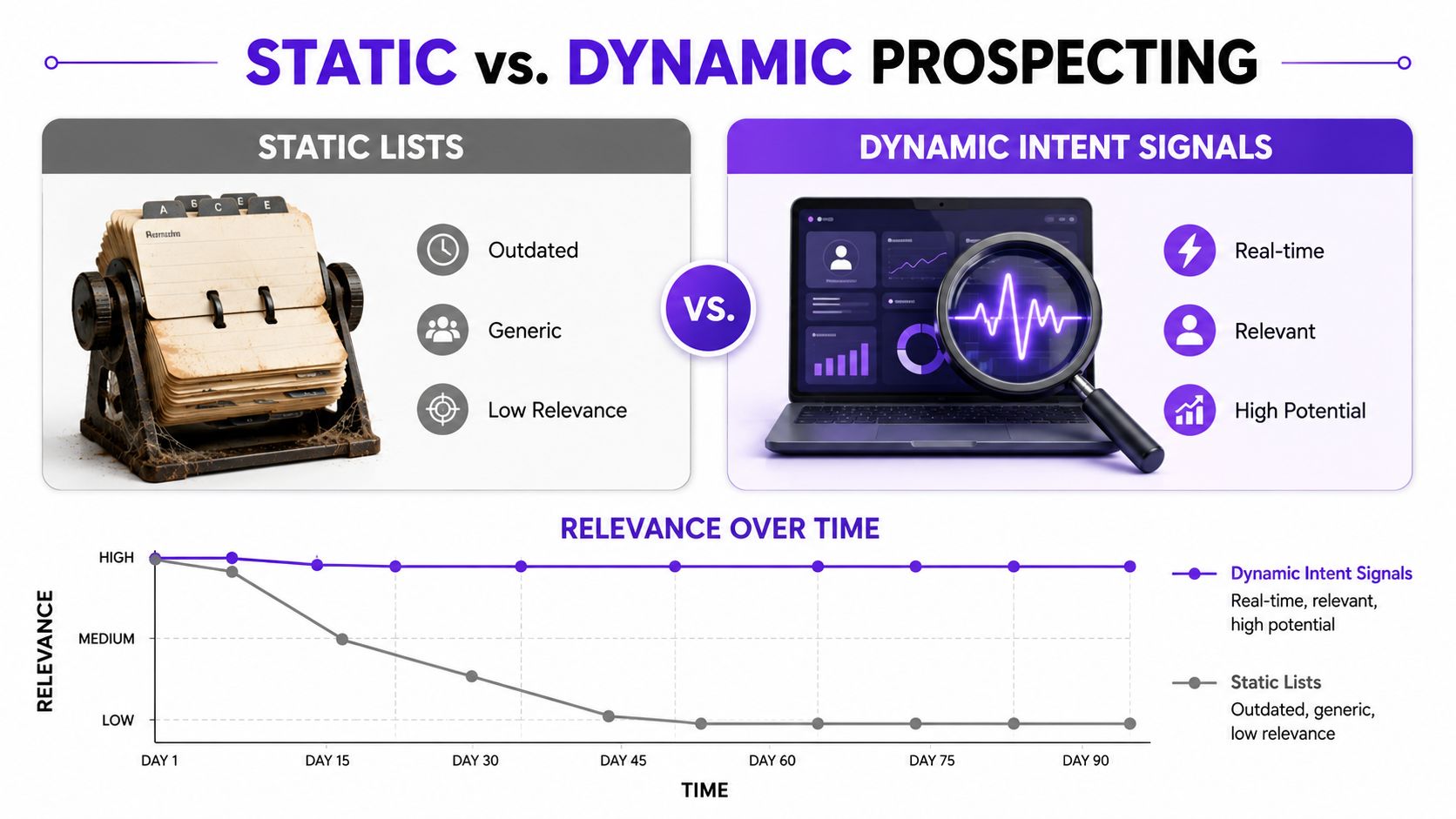
If you're still relying on title, company size, and industry alone, you're guessing. A better approach is intent-based marketing, where activity and timing shape your outbound priority.
Prospecting Methods Compared: Static vs. Dynamic Signals
Attribute | Static Signals (The Old Way) | Dynamic Signals (The New Way) |
|---|---|---|
Core data | Job title, industry, headcount | Funding, job changes, content engagement, buying behavior |
Timing | Often outdated by the time you export it | Current and tied to visible activity |
Message relevance | Generic and role-based | Specific and event-based |
Research burden | Heavy manual verification | Lighter once signal tracking is in place |
Best use | Broad account coverage | Prioritizing who deserves outreach now |
Main weakness | Looks precise while missing urgency | Requires discipline and interpretation |
What static data misses
A static list won't tell you that a prospect just got promoted, is commenting on a competitor's content, or is helping hire into the exact team your product serves. It also won't show that the "decision maker" on your sheet left the company months ago.
Dynamic signals do a better job of answering the only question that matters at the top of funnel: why this person, at this company, at this moment?
The High-Intent Prospecting Playbook
Intent-based prospecting isn't magic. It's a repeatable set of plays. You watch for a trigger, interpret it correctly, and then contact the people tied to the initiative while the issue is still warm.
Start with this visual summary.
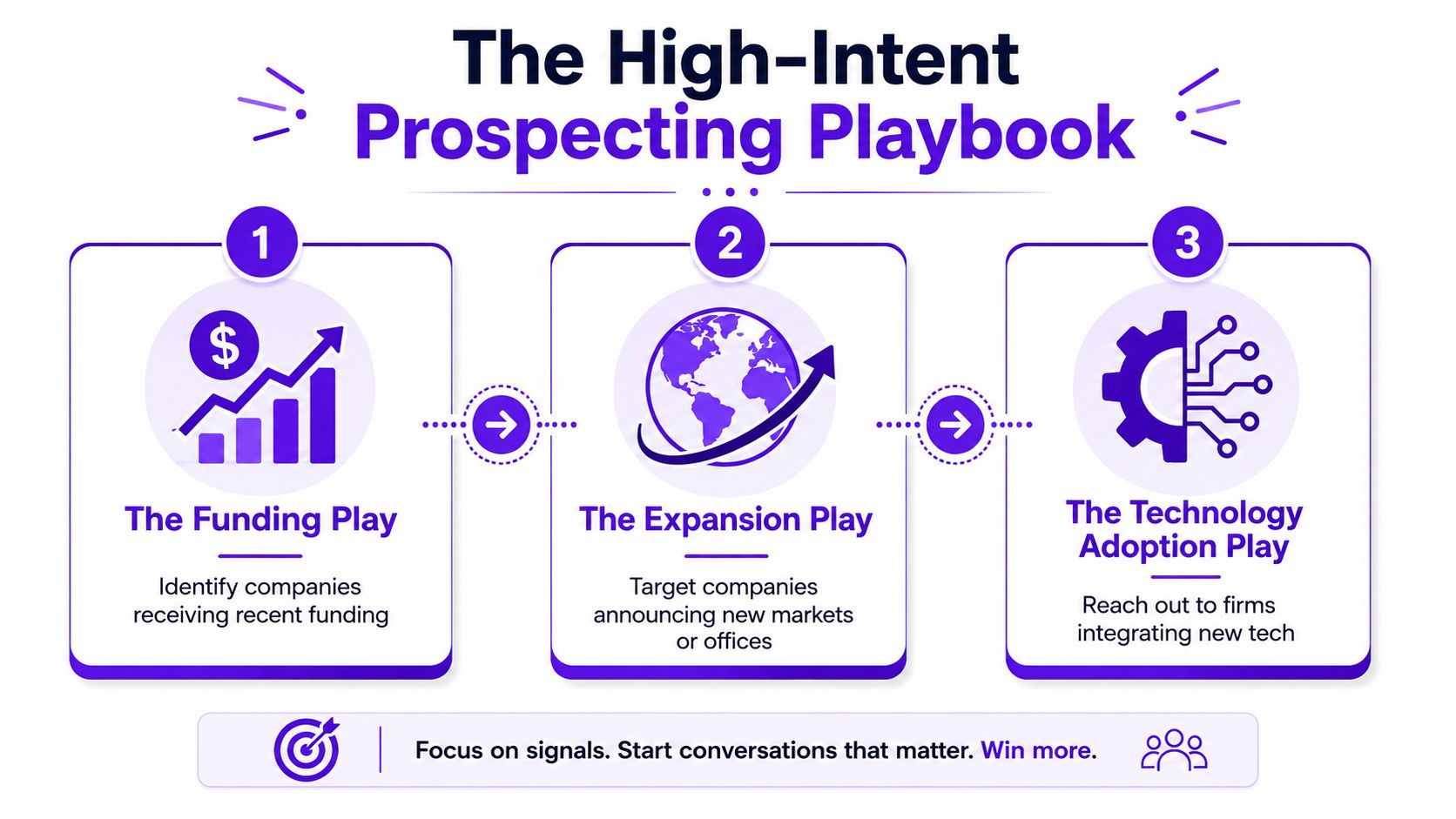
One trigger deserves special attention. According to Fundraise Insider's guide to finding decision makers in companies, there is a 90-day window after a funding announcement where 78% of decision makers in growth roles actively evaluate new vendors, and targeting companies in that window yields a 3.1x higher conversion rate for initial meetings than static lists.
Play One Use the Funding Trigger
Funding changes behavior. Teams hire, priorities tighten, and leaders start making decisions they postponed before capital arrived.
Use the signal like this:
Watch recent funding announcements and focus on accounts still inside that post-announcement window.
Search for growth owners such as CRO, VP Sales, CMO, revenue operations leaders, and operators tied to scale.
Read the announcement language closely. It often reveals the initiative. Expansion, hiring, product acceleration, and market entry all suggest different buyers.
If you're selling into growth teams, this is one of the cleanest reasons to reach out. The trigger is public, relevant, and easy to reference without sounding forced.
A short explainer helps if your team needs a visual reset on timing and prioritization.
Play Two Watch Job Change Signals
New leaders are easier to engage because they need wins. A new VP or Head usually reviews vendors, resets priorities, and wants to show movement.
This doesn't mean every job change is a buying signal. It means role changes are useful when paired with context. A newly hired operations leader at a company that's also expanding is more interesting than a random title update in a stable account.
Check for:
Promotions into ownership roles
Executive hires tied to scaling
New leaders posting about plans, priorities, or team buildout
Contacting someone after a role change works best when you connect the new responsibility to a problem they now own.
Play Three Track Engagement Around Relevant Topics
Modern prospecting gets sharper than list building by watching who comments on creators in your space, who engages with competitor posts, and who participates in conversations tied to the pain you solve.
The signal doesn't need to be dramatic. A thoughtful comment on a relevant post can tell you more than a database field ever will. It shows awareness, language, and often the angle that matters most to the buyer.
Good places to watch:
Competitor content for active category interest
Industry creators for education-stage engagement
LinkedIn events and discussions for visible topic-level intent
Niche communities where professionals discuss current operational problems
This method is less about scraping names and more about reading behavior. That's why it works.
Crafting Outreach That Actually Gets Replies
A signal gives you a reason to reach out. It doesn't write the message for you. At this stage, plenty of decent prospecting falls apart. Reps find a good trigger, then send a stiff note that sounds like it was approved by six managers and a legal intern.

The upside is real when the message matches the moment. Dock's library on B2B decision makers notes that using predictive intent data to target prospects actively researching your product category boosts success chances by 2.5x compared to static firmographic lists.
If you want structure, a strong cold email template helps, but the trigger has to shape the copy.
A funding message that sounds human
Bad version: "Congrats on the funding. We help companies scale. Can we book 15 minutes?"
Better version:
Saw the funding news. Congrats.
Usually that kicks off a wave of hiring and pressure to turn plans into execution.
If [function] is now on the clock, I can share a few ideas other teams use to tighten that ramp. Worth a quick chat?
Why it works: it references a public event, ties it to a likely operational reality, and doesn't overplay familiarity.
A job-change opener that earns a response
You don't need fake flattery. You need relevance.
Try this:
Opening line: "Noticed the new role. Congrats on the move."
Context line: "New leaders usually inherit a stack of priorities and a short runway to show progress."
Reason for message: "If improving [specific workflow] is on your list, I can share what teams usually clean up first."
That message respects their situation. It doesn't assume they need your product. It offers a useful conversation.
An engagement-based note that does not feel creepy
If someone commented on a post, don't write like you've been hiding in a digital hedge.
Use the topic, not the surveillance.
Example:
Your comment on the discussion about [topic] caught my eye, especially the point about [specific issue].
A lot of teams are running into the same problem when they try to scale [function].
Curious if that's an active priority on your side too.
That sounds observant, not invasive. Big difference.
How to Find and Convince Hidden Economic Buyers
One of the biggest prospecting mistakes is assuming budget lives only with finance or the C-suite. In a lot of companies, especially mid-market firms, the actual buyer is the leader who owns the initiative.
That's why "find the CFO" is often lazy advice.
Recent Gartner data cited in Belkins' article on finding decision makers says 68% of mid-market companies route tech and service budgets through Head of Growth or VP of Operations roles, yet 82% of prospecting guides still prioritize traditional finance titles, causing reps to miss 40% of active buying committees.
Look for initiative ownership
A hidden economic buyer usually has three traits:
They own the project outcome
They control discretionary spend or pilot budget
They don't always look like the traditional buyer on an org chart
That means you should search for leaders attached to outcomes such as growth, operations, revenue execution, or transformation. If the project is urgent and cross-functional, these roles often matter more than finance during the early and middle stages of the deal.
How to persuade them
Don't pitch status. Pitch control.
Functional buyers care about whether you help them hit the goal they own. Talk to them about execution risk, rollout friction, and the business result they're trying to produce. A hidden buyer usually says yes because the initiative needs to move, not because the title sounds impressive.
Frequently Asked Questions About Finding Decision Makers
1. Should I always start with the CEO?
No. Start with the person closest to the initiative and map upward or sideways from there. In some deals that's a VP, Director, or functional lead.
2. What's the fastest way to identify the buying committee?
Talk to one credible contact and ask direct qualifying questions about budget, approval, and implementation. Then validate your account map against public signals and internal referrals.
3. How do I get past gatekeepers without sounding manipulative?
Treat them like professionals, not obstacles. Ask smart context questions, be clear about why you're calling, and make it easy for them to route you correctly.
4. Is email better than LinkedIn InMail?
It depends on the account and signal. Use the channel that matches where the prospect is active and responsive. If someone is highly visible on LinkedIn, start there. If the account is quieter, email may be cleaner.
5. Should I contact multiple people at the same company?
Yes, but do it with discipline. Keep the message role-specific. Don't send the same note to six people and hope internal confusion creates opportunity.
6. What if I can't find enough information on the company?
Use adjacent signals. Look at leadership posts, hiring activity, event participation, partner announcements, and relevant discussion threads. Silence on the website doesn't mean silence everywhere.
7. How do I prospect into enterprise accounts?
Go broader and slower. Enterprise deals usually need cleaner mapping, more internal context, and stronger sequencing across multiple stakeholders.
8. What about startups?
Move faster. Teams are smaller, titles are blurrier, and ownership can shift quickly. Focus on who owns the pain today, not who looks senior on paper.
9. Should I connect on LinkedIn before sending a message?
Usually yes, if your profile looks credible and your note is relevant. But if the trigger is time-sensitive, don't wait for a connection acceptance to start the conversation elsewhere.
10. Can automation help with how to find decision makers?
Yes, if it helps you track signals and prioritize relevance. No, if it just sends louder generic outreach to bigger lists. Good automation narrows your focus. Bad automation scales your mistakes.
RoverLead AI helps teams prospect the way modern buyers behave. Instead of pulling static lists and guessing who might care, it turns LinkedIn engagement into daily high-intent leads matched to your ICP, with context on the signal and an AI-written opener that makes outreach feel timely instead of random. If you want a faster way to spot real buying intent and spend less time digging through noise, take a look at RoverLead AI.