How to Avoid Spam Filters: A B2B Sales Guide

You wrote the sequence. The copy is clean. The offer is solid. Then the campaign goes live and your emails disappear into the digital basement.
That's the part nobody tells new SDRs fast enough. Inbox placement is rarely about one “spam word” or one unlucky subject line. It's usually a pattern. Your setup, your list, your sending behavior, and your relevance all vote on whether you reach the inbox.
If you want to know how to avoid spam filters, stop thinking like a copy hacker and start thinking like a trustworthy sender. Mailbox providers care less about your clever workaround and more about whether your behavior looks like a real, permission-aware business or a volume machine wearing a blazer.
Table of Contents
The Foundations Technical Setup That Proves You Are Legit
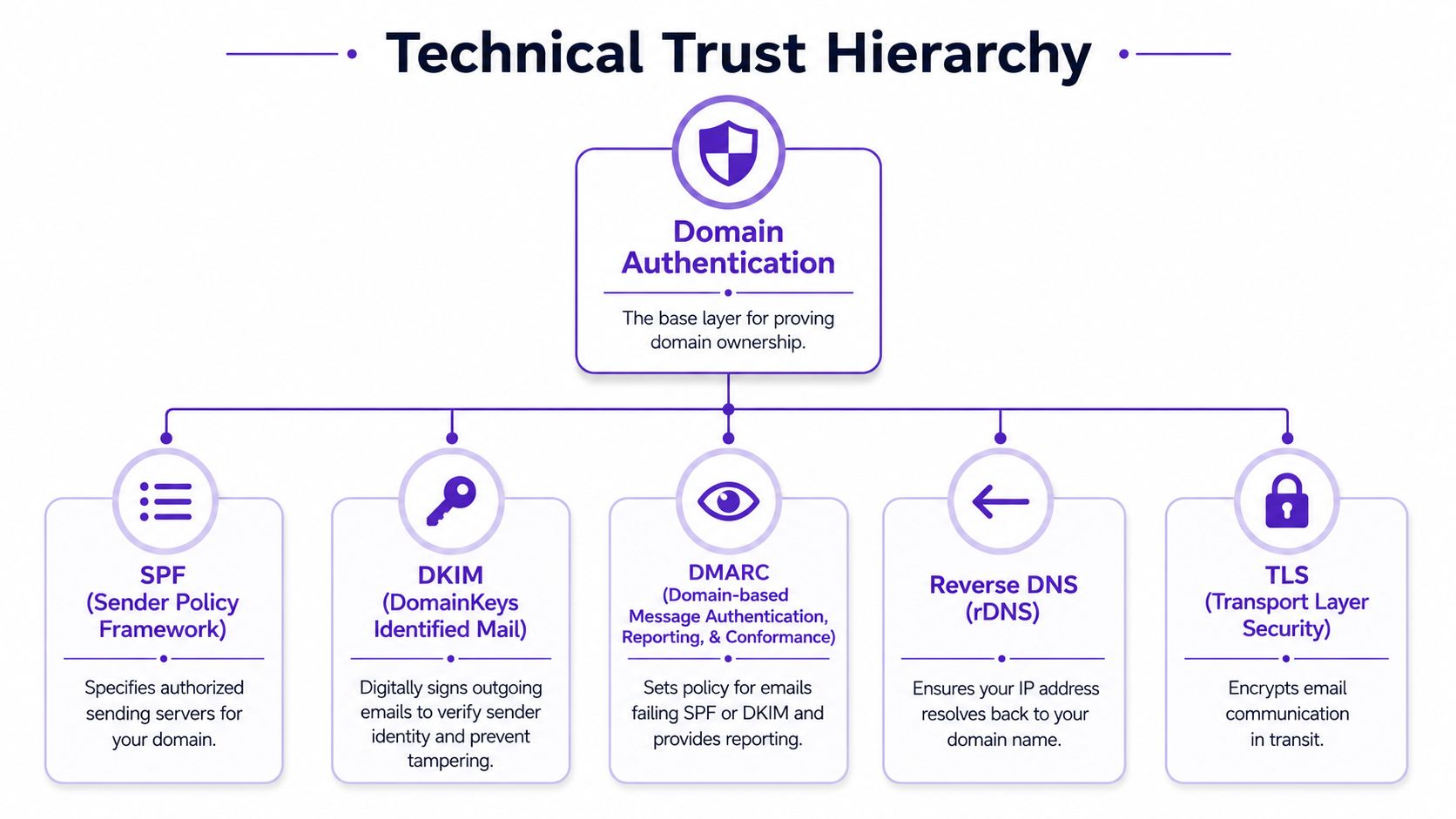
Before you obsess over copy, prove your domain belongs in the room. SPF, DKIM, and DMARC are your digital passport. If those records are missing or broken, mailbox providers have a good reason to distrust you.
Start with the non-negotiables
SPF tells the world which services are allowed to send on your behalf.
DKIM signs your messages so receiving servers can verify they weren't tampered with.
DMARC ties those checks together and tells providers how to handle failures.
If you use Google Workspace, Microsoft 365, Outreach, Salesloft, Apollo, Smartlead, Instantly, or another sending platform, make sure each one is properly aligned with your domain setup. A half-configured tool stack is how good teams accidentally look sketchy.
Practical rule: If you add a new sending tool, re-check authentication before the first campaign. “It worked on the last platform” means nothing.
The extra checks that make ops people sleep better
Technical trust doesn't stop at the big three. Reverse DNS and TLS also help reinforce legitimacy, especially when you're scaling outbound across multiple inboxes.
A simple working habit helps:
Check your DNS records: Confirm the records exist and are active in your domain host.
Send test emails: Review headers in Gmail or Outlook to make sure authentication passes.
Keep providers aligned: Don't let one team send from a tool the ops team never authenticated.
Deliverability teams often watch sender reputation through a sender score. TinyMCE notes that a sender score of 80+ is generally associated with lower spam-filter risk, which makes clean authentication more than a technical nicety. It becomes a measurable trust signal, as summarized in MailReach's deliverability guidance.
Your List Is Your Reputation List Hygiene and Segmentation
Bad lists ruin good copy. Every time.
You can write the sharpest outbound email in your org, but if you send it to stale contacts, scraped records, and role-based inboxes, filters see the pattern long before a buyer sees your value prop. This is pure garbage in, garbage out.

Clean data beats big data
A healthy list does three jobs at once. It reduces bounces, lowers complaints, and increases the odds that the people receiving your message care. That last part matters more than is often acknowledged.
Purchased or scraped lists are attractive for the same reason gas-station sushi is attractive when you're in a hurry. Fast decision, regrettable outcome.
Here's the practical position:
Avoid bought, rented, or scraped contacts: MailReach and Thomas both warn against them because they damage reputation and deliverability.
Remove dead weight: Suppress invalid, inactive, and obviously mismatched contacts.
Be careful with role accounts: Addresses like info@ or sales@ often carry more risk and less intent.
Segment by relevance: Split by persona, industry, trigger event, or engagement level so each email has a reason to exist.
Validity also warns that a spam complaint rate above 0.1% means more than 1 in 1,000 recipients are reporting your message as spam, which can trigger filtering or worse placement. That benchmark is one reason list quality isn't a “nice to have.” It's operational risk, according to Validity's spam filter guidance.
Engaged List vs. Purchased List
Metric | Clean & Engaged List | Purchased & Dirty List |
|---|---|---|
Audience fit | Built around relevance and intent | Built around convenience |
Bounce risk | Lower because records are maintained | Higher because data ages badly |
Complaint risk | Lower when recipients recognize the context | Higher when outreach feels unsolicited |
Replies | More likely to be genuine | More likely to be negative or nonexistent |
Reputation impact | Supports inbox placement over time | Erodes trust fast |
A smaller list that matches your ICP beats a giant list that barely recognizes your company name.
Play the Long Game Sender Warm-Up and Behavior
New inbox. Big blast. Bad idea.
When a brand-new sending identity suddenly starts pushing volume, mailbox providers don't see ambition. They see suspicious behavior. It's the email version of walking into a networking event and shouting your pitch before you've said hello to anyone.
What normal sending looks like
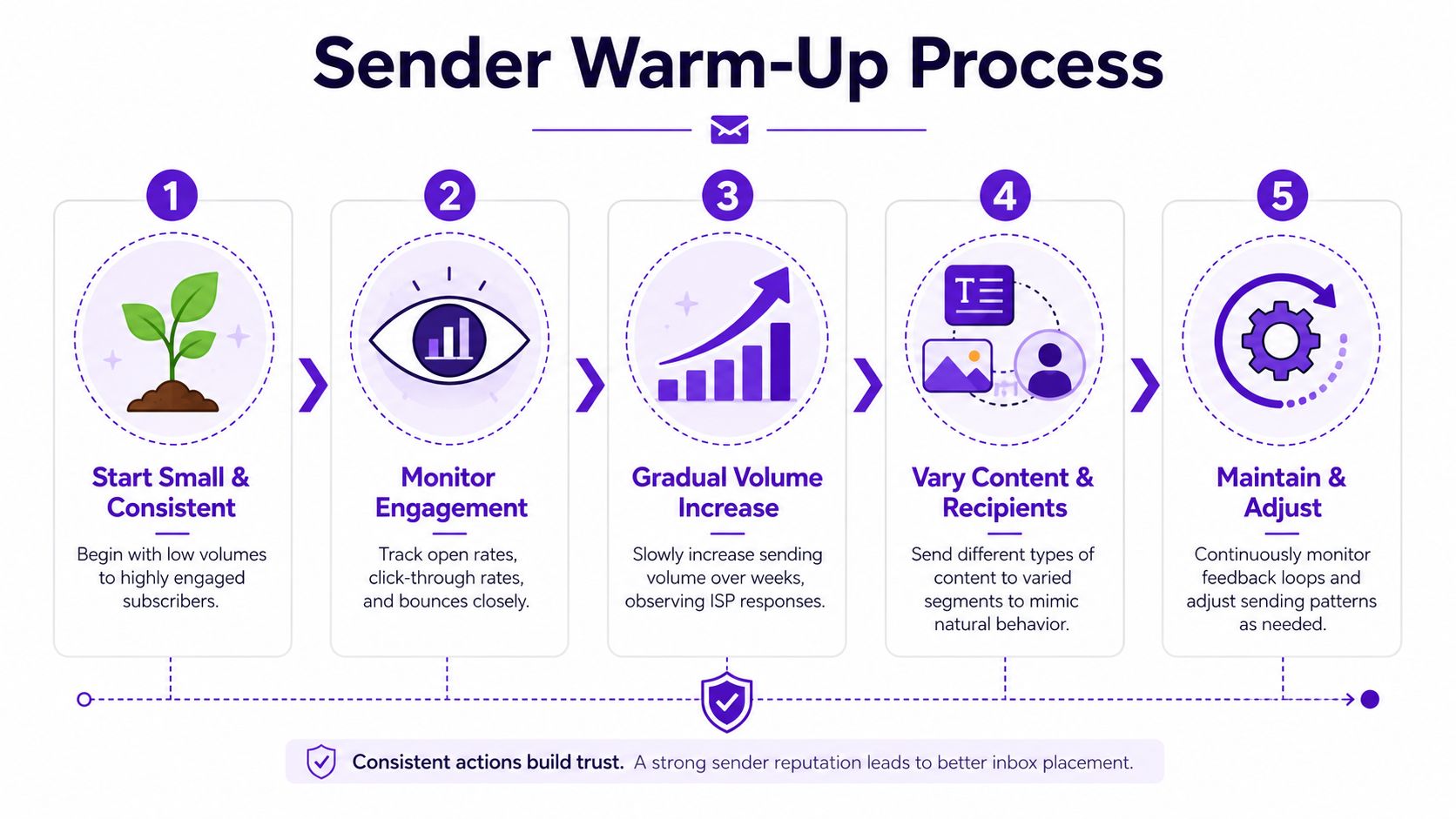
Warm-up exists because providers judge patterns, not just messages. A new domain or inbox that behaves steadily looks more legitimate than one that jumps from silence to heavy outreach.
A practical benchmark from Saleshandy is to start at 30–50 emails per day per inbox and scale slowly, often leaving 24 hours between outreach in early warm-up. Sudden spikes can trigger filters even when the email copy itself is clean, as outlined in Saleshandy's warm-up recommendations.
That means your first instinct should be restraint:
Begin with low volume: Use your best-targeted prospects first.
Increase gradually: Don't double volume just because the first day looked fine.
Watch engagement and complaints: Behavior after send matters as much as the send itself.
A useful walkthrough on the process is below.
Behavior that gets you flagged
The obvious mistake is sending too much, too soon. The less obvious mistake is sending in rigid, machine-like patterns. If every message goes out at the same moment, with the same formatting, to a cold audience, filters notice.
What works better is boring consistency:
Steady cadence: Send like a disciplined team, not a script having a caffeine episode.
Target active recipients first: Engagement supports reputation.
Pause when signals worsen: If replies dry up and complaints rise, fix the campaign before adding more volume.
Good deliverability is usually unglamorous. That's why it works.
It Is Not Just What You Say Crafting Spam-Proof Content
A lot of advice about how to avoid spam filters still sounds like it came from an era when replacing letters with symbols felt cutting-edge. That era is over.
Paul Graham's 2002 writing on Bayesian filtering helped popularize the move from crude keyword blocking to probabilistic classification. His point was simple and still useful: once filters have enough training data, goofy obfuscation stops helping. Tricks like variant spelling, weird spacing, or punctuation inside words don't change the underlying pattern enough to save you. That shift is part of why modern systems care more about reputation and relevance than text gimmicks, as discussed in Paul Graham's essay on Bayesian spam filtering.
Why old spam advice aged badly
“Don't say free” isn't wrong. It's just incomplete.
Modern filtering systems evaluate context. If your message feels misleading, over-designed, overly promotional, or disconnected from the recipient, you can still lose inbox placement without using any classic “spam words” at all. The question isn't whether your copy avoided a blacklist term. The question is whether your email looks like something a real person would welcome.
What good outbound copy does now
Strong B2B emails usually share the same traits:
They open with relevance: Mention a real trigger, role problem, or business context.
They stay text-forward: Validity recommends an 80/20 text-to-image split, which is a good reminder that image-heavy outreach often looks suspicious.
They avoid deception: No fake RE:, no fake urgency, no bait subject line.
They make opting out easy: People who can leave without hassle are less likely to report spam.
If your team needs help tightening message structure, study a few solid cold email template examples and notice what they don't do. They don't over-design. They don't over-promise. They don't sound like legal-compliant spam wearing “personalization” as a mustache.
The best cold email is the one a buyer doesn't regret opening.
Beyond the Inbox Special Precautions for LinkedIn Messaging
Some reps behave on LinkedIn like spam filters don't exist because there isn't a spam folder sitting in plain sight. Buyers still feel the same friction. Copy-pasted connection requests, instant pitch slaps, and generic “just wanted to connect” notes are social spam with better branding.
LinkedIn has its own version of spam
The common assumption is that LinkedIn is automatically warmer than email. Not true. LinkedIn is only warmer when context exists.
If someone comments on a relevant post, asks a buying question, reacts to competitor content, or discusses a problem you solve, that's context. If you grabbed their title from a search result and sent a templated message, that's just another list pull in a different costume.
The better move is to treat LinkedIn as a signal source, not a blasting channel. That's the whole logic behind modern social selling on LinkedIn.
Use intent, not volume
Good LinkedIn outreach usually follows this order:
Notice a real signal such as discussion, engagement, or visible need.
Reference the signal so the message feels anchored in reality.
Start a conversation instead of forcing a meeting request on line one.
A few practical habits help:
Don't pitch in the connection request: Most of them read like popup ads in human form.
Use profile and post context carefully: Specific beats creepy.
Match channel to stage: If the prospect is engaging publicly, a thoughtful comment may work better than a DM.
Email and LinkedIn have different mechanics, but the same rule wins on both. Relevance beats reach.
The Pre-Send Checklist for B2B Sales Pros
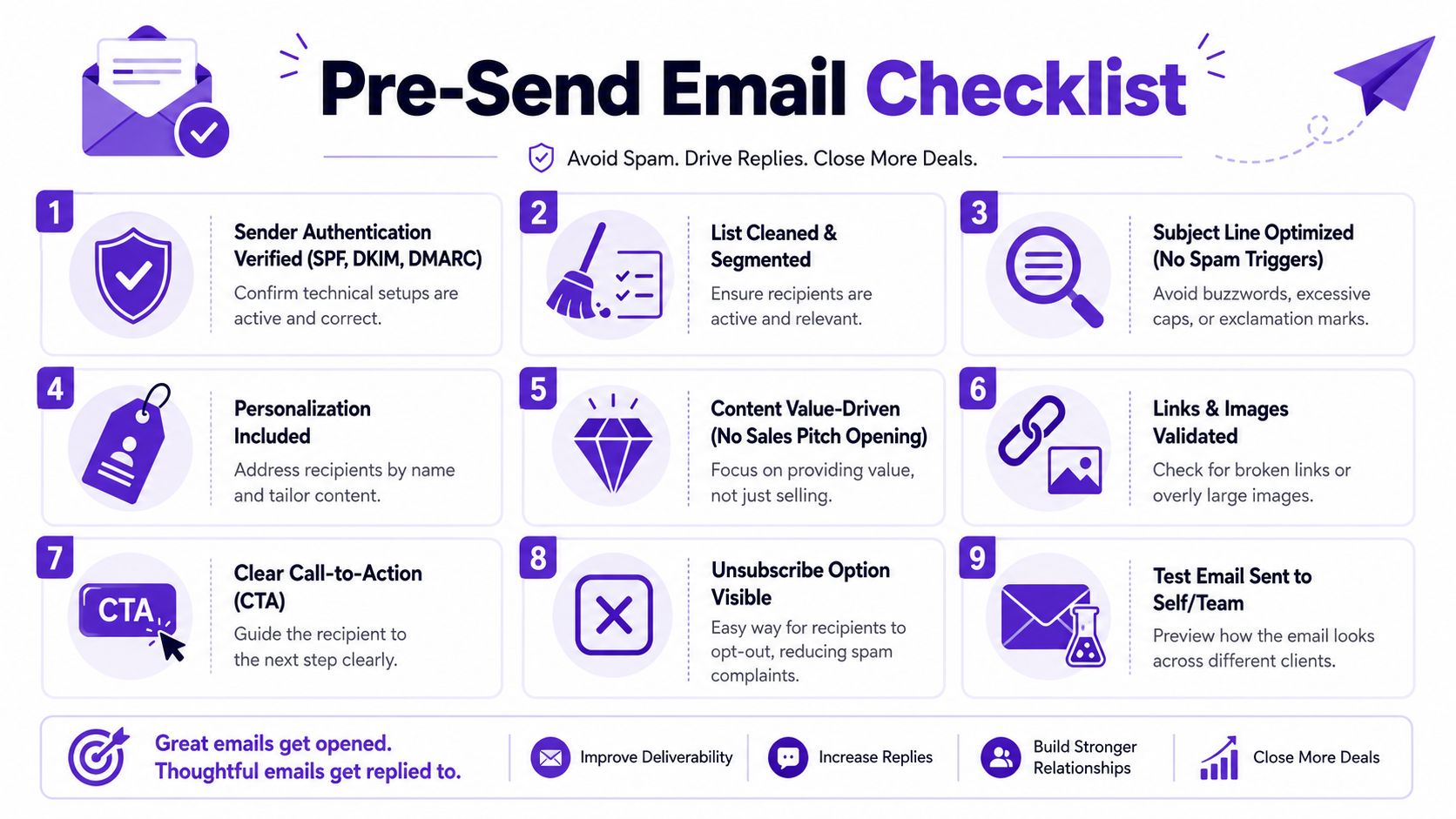
You don't need a thirty-point compliance ritual before every campaign. You need a fast pre-flight check that catches preventable mistakes.
Nine questions before you launch
Run through these before you hit send:
Is authentication verified: SPF, DKIM, and DMARC should be passing.
Is the list current: Remove junk, stale records, and poor-fit contacts.
Is the segment tight: One clear audience beats one broad blast.
Is the inbox warmed: Don't push volume from a cold sender.
Does the subject match the email: No bait, no tricks.
Is the message mostly text: Keep formatting simple and readable.
Is the CTA low-friction: Ask for a reply, not a marriage proposal.
Can recipients opt out easily: Fewer complaints, cleaner reputation.
Did you test the email first: Send to yourself or your team and verify rendering.
If you want a companion process for checking engagement after launch, this guide on how to see if an email was read is useful, as long as you remember that delivery quality matters before tracking does.
Frequently Asked Questions About Spam Filters
1. Why do good cold emails still land in spam?
Because mailbox providers judge more than copy. Setup, list quality, sending behavior, and recipient response all matter.
2. Is avoiding spam words enough?
No. That advice is outdated on its own. Filters are far better at spotting suspicious patterns than they were in the keyword-blocking era.
3. Should I buy a list if I need pipeline fast?
No. It creates reputation risk and usually hurts the exact channel you're trying to scale.
4. Are role-based emails worth contacting?
Sometimes, but be careful. They often carry lower intent and more risk than direct, person-based addresses.
5. How much personalization is enough?
Enough to show the message belongs to that prospect and that reason. Not enough to sound stalkerish or forced.
6. Do images hurt deliverability?
They can if the email becomes too image-heavy. For outbound, simple and text-forward usually performs better.
7. Should I use separate inboxes for outbound?
Many teams do, because it helps control volume and isolate risk. What matters is that each inbox behaves like a legitimate sender.
8. Can one bad rep damage the whole team?
Yes. Shared domain or IP reputation means one person's bad behavior can create problems for everyone else sending from the same setup.
9. Is LinkedIn outreach safer than email?
Safer is the wrong word. It's more forgiving when you use context well, and just as annoying as email when you don't.
10. What's the simplest rule for how to avoid spam filters?
Send to people who are likely to care, from infrastructure that proves you're legitimate, at a pace that looks human.
If your team wants more conversations without blasting bigger cold lists, RoverLead AI is worth a look. It helps B2B sales teams turn LinkedIn engagement into high-intent leads, so reps can start outreach from real buyer signals instead of guessing who might care.