
Automatic Lead Generation: What It Is and How It Works

Most advice about automatic lead generation starts in the wrong place. It tells you to buy a bigger database, add more sequences, personalize every opening line with AI, and turn the volume dial until pipeline appears. That's not a growth strategy. That's a faster way to annoy people who never had a reason to buy.
Automatic lead generation works when software helps your team exercise better judgment at scale. The system should identify accounts that fit your ICP, detect evidence of active intent, route that context to the right seller, and keep a human in control of the message. Signal quality, timing, and approval loops matter more than message volume.
Table of Contents
Why Most Teams Get Automatic Lead Generation Wrong
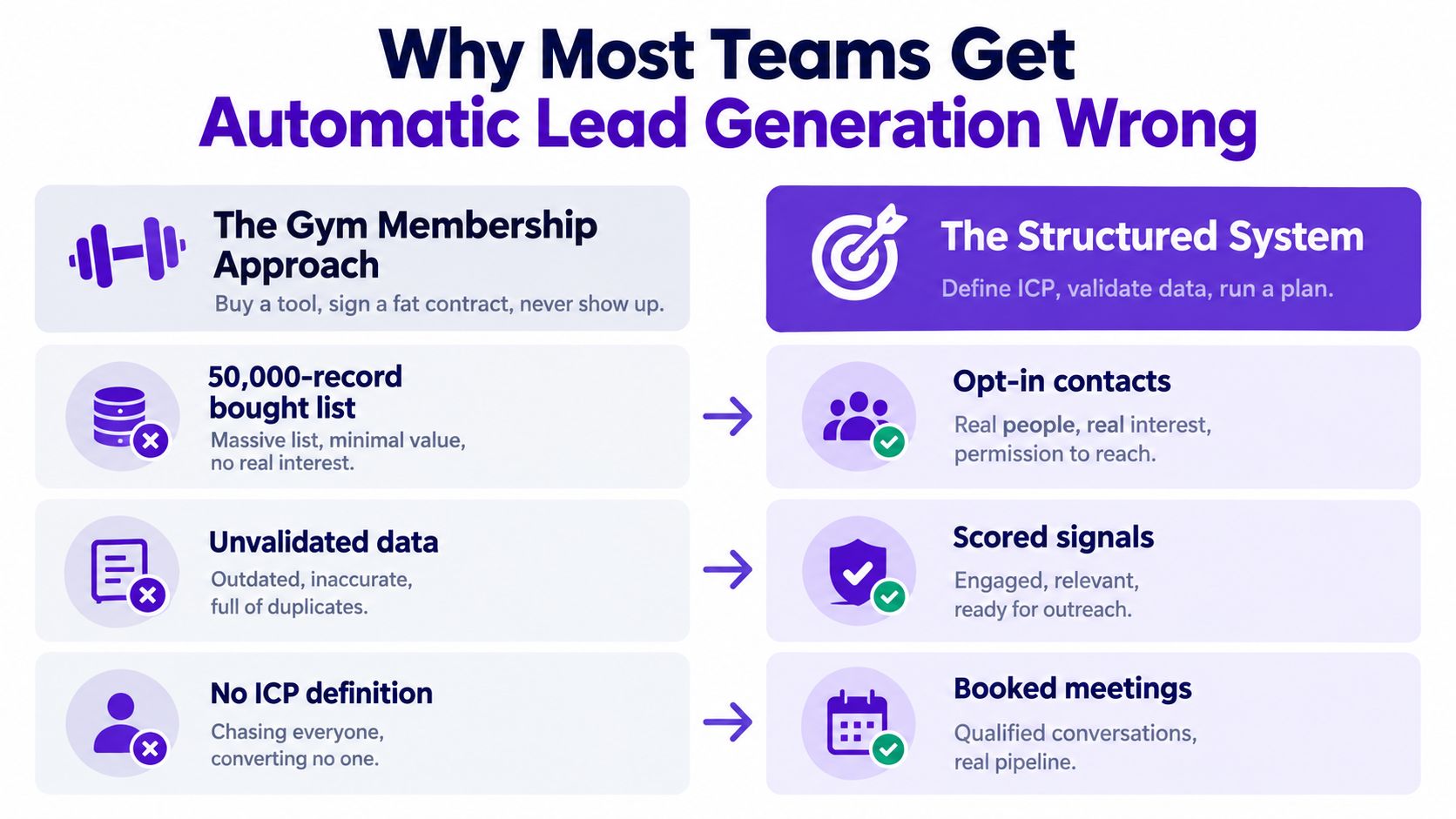
A team buys a sequencing tool, imports 5,000 contacts, adds a supposedly personalized opening line, and watches replies flatline below 1%. The failure is predictable. The system optimized activity before anyone proved that the accounts fit, the contacts were current, or the timing made sense.
The mistake is treating automation as a volume lever. Software cannot judge whether a job title is stale, whether a company fits your market, or whether a prospect recently changed vendors. It executes the rules your team provides. Feed it guessed emails, weak firmographics, and a list built for size, and it will send poor messages faster.
The operating model that separates signal from noise
Use automation to extend signal-based targeting, not replace judgment. Define a narrow ICP, verify contact data, monitor observable triggers, and give sellers a clear approval point before outreach. Useful triggers include a relevant hiring push, a leadership change, a new regulatory burden, competitor engagement, pricing-page behavior, or a clear shift in the company's market.
Signal quality often matters more than another copy edit. A controlled benchmark covering 389,890 prospects found broad role-based targeting produced a 13.0% reply rate, compared with 51.9% for verified ICP and subject-matter match. The same benchmark reported that personalized video lifted replies from 28.8% to 40.4% and meetings from 4.1% to 6.4% (Prospectio's LinkedIn benchmark).
The recommendation is straightforward: automate research, routing, and follow-up, but require human approval when the system turns a signal into a claim about a prospect. That loop protects relevance and gives your scoring model better outcomes to learn from.
Practical rule: Send fewer messages to better-fit accounts, and make the trigger do more work than the adjective in your first line.
What Automatic Lead Generation Actually Means
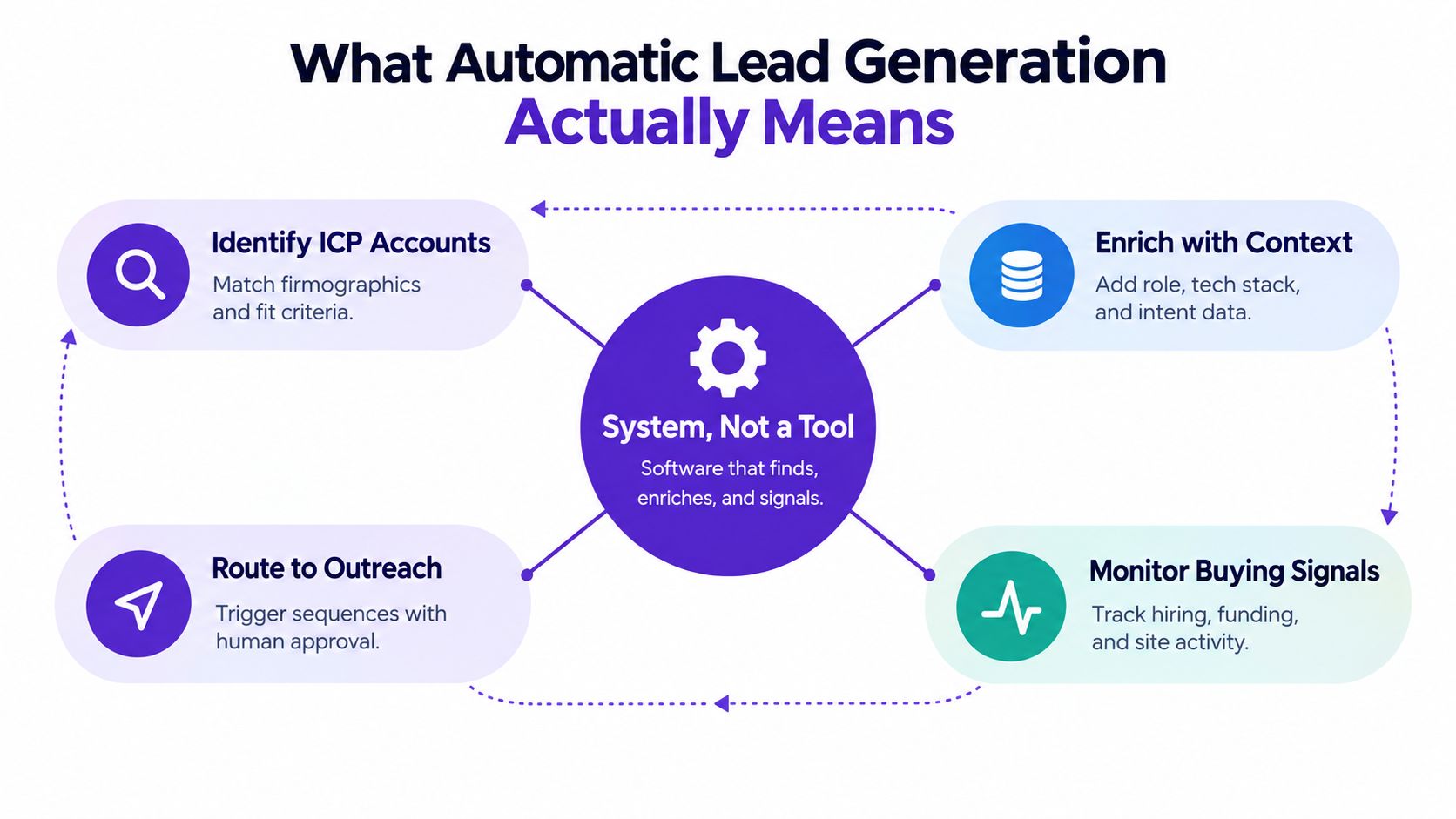
Automatic lead generation is a system, not a tool. It uses software and data to identify accounts or contacts that match your ICP, enrich them with useful context, monitor buying signals, trigger routing or outreach, and feed outcomes back into the scoring model.
Think of it as a smoke detector for your market. The sensors are intent data, job changes, product usage, content interactions, pricing-page visits, and relevant company events. Your CRM and rules engine act as the control panel. When the evidence crosses a threshold, the system alerts an SDR or AE with enough context to act intelligently.
A definition your team can use
A workable definition is: automatic lead generation detects in-market accounts and delivers qualified, signal-backed leads to sales with minimal manual prospecting work.
That definition has three important filters:
Qualified: The account fits your commercial and operational criteria.
Signal-backed: There's observable evidence that a problem or buying motion may be active.
Sales-ready context: The rep can see why the lead matters before deciding whether to reach out.
A database export only solves the first layer, and often poorly. A sequence tool only solves delivery. A complete system connects identification, enrichment, intent detection, human review, outreach, and learning. For a useful grounding in the broader category, see this B2B lead generation definition.
If a workflow merely scrapes contacts and sends messages on a schedule, call it what it is: an expensive mail merge.
The Channels That Actually Drive Pipeline
Channel choice depends on deal size, sales-cycle complexity, market maturity, and how much intent data you can observe. Don't build a channel stack because a vendor demo made every channel look equally productive. Build a portfolio where each channel has a distinct job.
Channel | Setup Effort | Intent Depth | Typical Reply Rate | Best Fit |
|---|---|---|---|---|
Cold email | Medium | Low to high, depending on signals | Qualitative range varies by list quality | Broad B2B coverage and nurture |
LinkedIn outbound | Medium | Medium to high when activity is visible | 5% to 15% with proper targeting, according to Overloop's LinkedIn and email comparison | Mid-market selling where identity and context matter |
Inbound forms and routing | High | High | Qualitative, usually strongest when intent is explicit | Demo requests, pricing interest, and content-led demand |
LinkedIn paid social | High | Medium | Qualitative | Narrow vertical campaigns with strong creative |
Partnerships and integrations | High | High | Qualitative | Trust-led categories and ecosystem sales |
Communities and newsletters | Medium | Medium | Qualitative | Long-term authority and relationship building |
LinkedIn deserves special attention because the channel exposes both identity and behavior. A 2026 study across 15 million plus contacts reported an overall reply rate of 7.2%, with industry ranges from 4.2% to 10.5%. It also recorded 18.7% invitation acceptance, 17.6% follow-up replies among connected prospects, and 1.3% of connected prospects ultimately booking a meeting (Belkins' LinkedIn outreach study).
Email still has a role, especially for volume and structured nurture. Inbound routing can produce stronger conversations because the buyer has already taken an action. Partnerships and communities move slower, but they often create more durable trust. Treat channels as a portfolio, then let intent depth determine where your team spends attention. This LinkedIn lead generation guide gives the channel a more focused operating treatment.
Why Buying Signals Beat Better Copy
Better copy cannot create a reason to buy. A buying signal shows that a problem may be active now, giving the rep a defensible reason to start a conversation. Useful signals include hiring for a role your product supports, publishing an RFP, changing vendors, expanding into a region, announcing new leadership, or engaging with competitor content.
First-party signals deserve the greatest weight because your team owns the context. Product usage, repeated pricing-page visits, demo activity, and content interactions can indicate behavior close to a buying decision. Third-party signals, including job boards, news, social posts, and review sites, widen coverage but require validation before outreach.
Signal Source | Intent Depth | Capture Effort | Example |
|---|---|---|---|
Product and CRM activity | Very high | Low to medium | Usage spike or repeated feature engagement |
Pricing and demo behavior | Very high | Medium | Pricing-page visit or demo request |
Job changes and hiring | High | Medium | Hiring a leader responsible for the problem |
RFPs and vendor changes | High | Medium to high | Public procurement or replacement motion |
Competitor engagement | Medium to high | Medium | Comments on competitor content |
Funding and expansion news | Medium | Low | New market or operating priority |
General firmographics | Low | Low | Industry, size, or title alone |
Signals should narrow the list before copy is written. That decision separates useful automation from personalized spam. A rep sees that a prospect commented on a competitor's pricing post last Tuesday. The opener references that comment and asks how the prospect is evaluating pricing, rather than repeating a generic industry pain point. The rep writes less because the evidence supplies the relevance.
The workflow should assign a signal, verify its timing, confirm the contact owns the problem, and then request human approval. A score alone is not enough. The rep needs to see the evidence and decide whether the proposed message earns a response.
Signal-based outreach generally produces stronger replies than cold outreach with no context, as noted earlier. For a practical framework on identifying and using these triggers, follow this buying signals in sales guide.
How an Automated Workflow Should Run End to End
An automated workflow should look less like an email cannon and more like a controlled production line. A signal enters the system, the account is enriched, the fit is scored, a human approves the action, and the outcome improves the next decision.
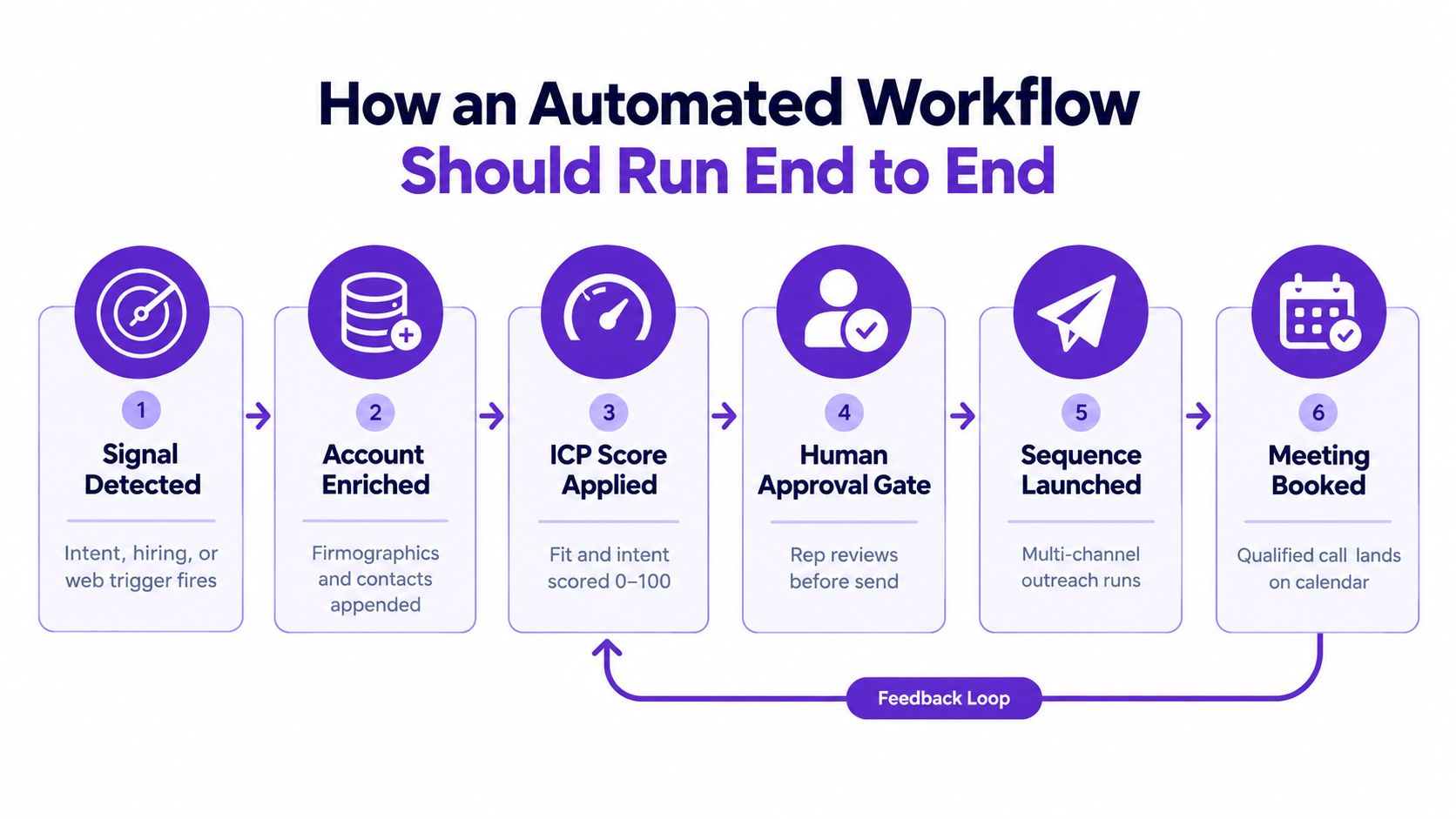
A signal source might detect intent, hiring, or meaningful web activity. Enrichment then appends the relevant company and contact information. The scoring layer combines fit and intent, but don't let a score become a permission slip for nonsense. A rep should see the evidence behind the score, not just a mysterious number.
The first approval gate belongs between scoring and sending. The rep checks whether the trigger is real, whether the contact owns the problem, and whether the proposed message sounds like a human wrote it. After approval, the system can launch a coordinated cadence across email, LinkedIn, and, where appropriate, phone or retargeting.
Replies need a second judgment point. A classifier can sort obvious responses, but a human should decide whether a vague “send details” reply means interest, politeness, or a request to disappear. Qualified conversations should move directly to a calendar, while objections and timing issues should update the nurture path.
The learning loop is the part often neglected. Booked meetings, no-shows, disqualifications, and polite rejections should all change the criteria used for the next batch. This lead generation automation resource covers the broader workflow category, but the operating principle is simple: automate repetition, not judgment.
Metrics Risks and Compliance You Cannot Ignore
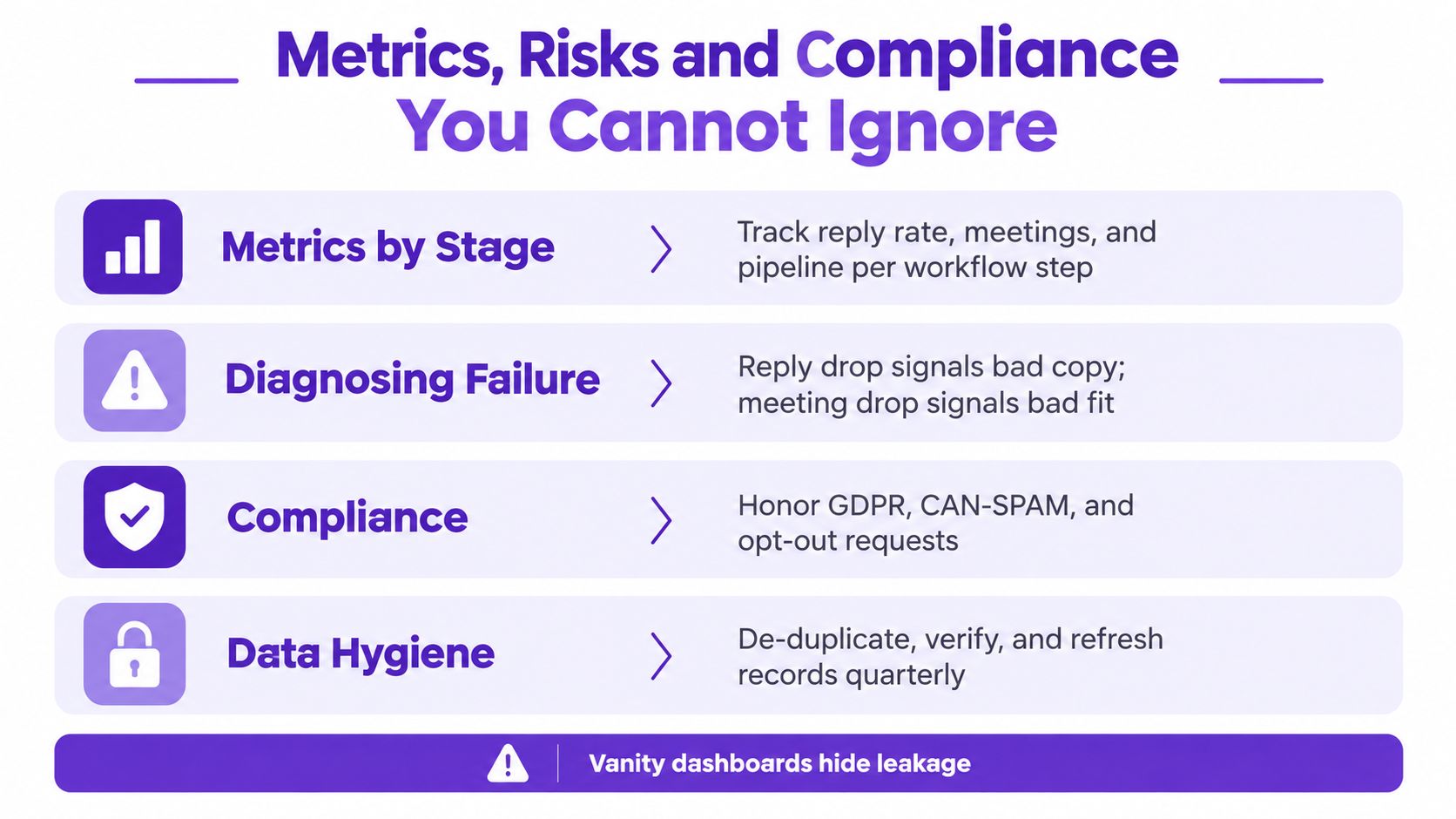
A dashboard full of sent emails and profile views can make a failing program look busy. Activity metrics belong in an operational report. Executives need to know whether qualified replies, meetings, show rates, and opportunities are improving at an acceptable cost.
Track the workflow by stage:
Targeting: Qualified accounts per reviewed batch and the percentage rejected before send.
Engagement: Meaningful replies, not opens or superficial clicks.
Conversion: Meetings booked, show rate, qualified opportunities, and pipeline created.
Economics: Cost per opportunity and seller time required to maintain the system.
The diagnosis should follow the leakage. A reply-rate drop usually points to weak signals, poor fit, or unconvincing relevance. If replies remain healthy but meetings stall, inspect qualification, routing, calendar friction, and the quality of the conversation.
Risk has two obvious forms. Poor list hygiene and aggressive sending damage deliverability, while generic mass messaging damages the brand and teaches buyers to ignore your domain. LinkedIn and email providers also impose platform rules that affect connection requests, scraping, and outbound volume. A 2026 limits guide reports about 100 LinkedIn connection invitations per week, roughly 100 daily messages to existing connections on free accounts and about 150 on paid accounts, with 50 Sales Navigator InMail credits per month (Valley's limits guide).
Compliance depends on region and channel. Review GDPR in Europe, CASL in Canada, CAN-SPAM in the United States, opt-out handling, data provenance, and each platform's terms before launch.
Decision rule: Small team plus complex deals means narrow targeting and heavy approval. Larger team plus repeatable deals can automate routing and follow-up more aggressively, but only after consent, suppression, and quality controls are in place.
A Realistic 30-Day Setup Playbook
Don't spend a month building a beautiful workflow that has never contacted a real prospect. Run the system in production with a small, controlled segment, and let real feedback shape the design.
Week one
Choose one ICP segment. Write down disqualification criteria, not just ideal traits. Select one signal source, such as relevant LinkedIn activity or leadership changes, and agree on what evidence is strong enough to enter review.
Week two
Connect the signal source to your CRM. Add a routing rule and create a review queue where a human approves every first touch. The queue should show the account, contact, trigger, source, and proposed opener in one view.
Week three
Test three short message variants against 150 accounts. Log reply quality rather than opens, and remove any variant that doesn't earn a meaningful reply within two weeks. Don't “optimize” a weak segment with prettier copy. Fix the segment first.
Week four
Add a second signal source only after the first one produces usable evidence. Set hard daily outbound caps per rep, then write bounce, unsubscribe, suppression, and duplicate rules. Verify that a reply pauses the sequence immediately and that every rejection reaches the scoring feedback loop.
A phased build prevents tool configuration from becoming a substitute for learning. By the end of the month, you should have a working queue, a reviewed message, a clear suppression policy, and enough evidence to decide whether scale is deserved.
The One Habit That Makes It All Work
The habit that keeps automatic lead generation honest is a weekly signal review, not a campaign review. Every Monday, bring a small group together and ask three questions: which signal produced replies, which produced meetings, and which produced nothing?
The answers should change routing. They shouldn't become a decorative slide in a revenue meeting. Teams that run this ritual stop chasing shiny tools and start compounding on the small set of signals that already create conversations.
Keep the meeting short and put the conclusion in writing. The decision may be boring, such as turning off a webhook, tightening a filter, removing a weak source, or raising the score threshold. Boring is good. It means the system is learning instead of performing.
AI personalization deserves the same scrutiny. One 2026 LinkedIn outreach report found AI-hyperpersonalized messages reduced acceptance by 12% and left reply rates flat within the same accounts, while overall outbound performance was 28.5% acceptance and 10.4% reply rates (Expandi's 2026 outreach report). More automation isn't the answer when judgment is missing.
Marketing automation can still expand lead volume and quality at scale. A compiled set of marketing automation data reports an 80% increase in lead quantity and cites a 451% increase in qualified leads for companies using automation to nurture leads (WebFX's lead generation statistics). The lesson isn't “send more.” It's to build a system that knows whom to contact, why now, and when a person should intervene.
The winning operating principle is straightforward: automate the search, preserve the judgment, and review the signals every week.
RoverLead AI helps B2B teams monitor LinkedIn activity for high-intent ICP signals, prepare context-rich openers, and run outreach only after a rep approves it. If you want to replace static prospect lists with a reviewed signal feed, visit RoverLead AI and set up your first ICP workflow.